2025.04.18
异常和File类
一、异常
1.1 异常体系介绍
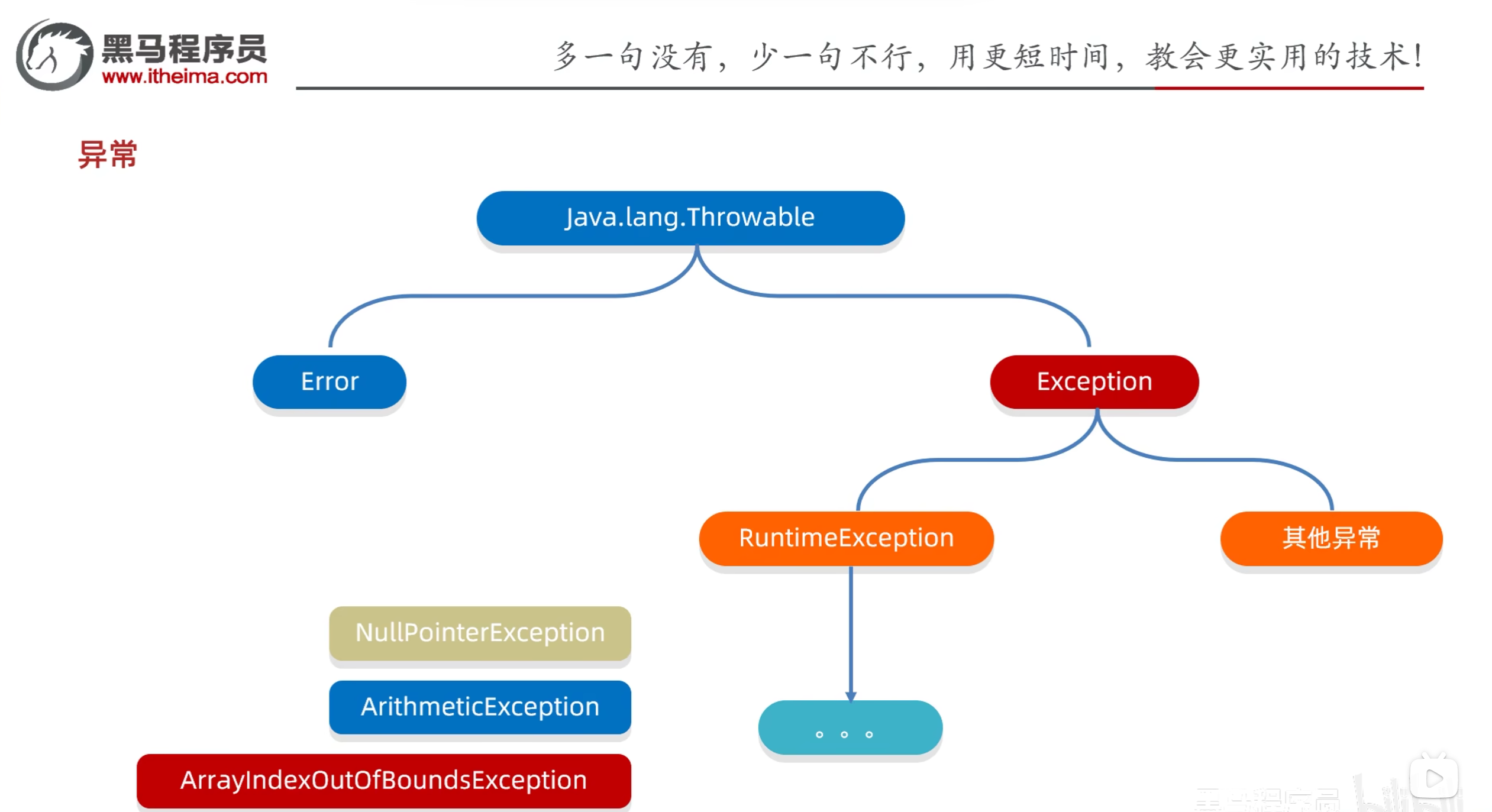
异常体系:
Java.lang.Throwable
Error:代表系统级别错误(属于严重问题)。系统一旦出现问题,sun公司会把这些错误封装成Error对象。Error是给sun公司自己用的,不是给程序员用的,所以我们开发人员不用管它。
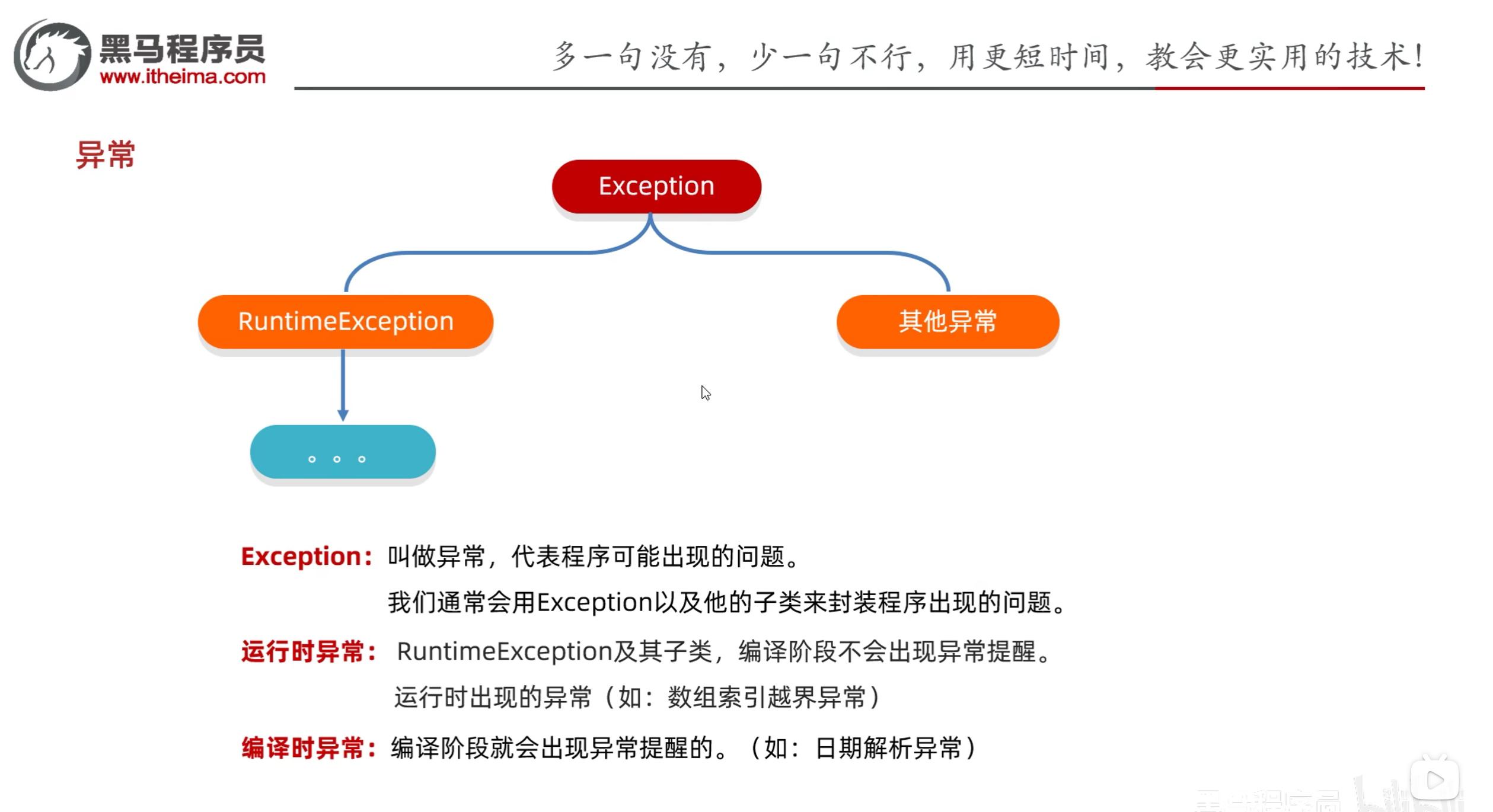
Exception:叫做异常,代表程序可能出现的问题。我们通常会用Exception以及它的子类来封装程序出现的问题。
RuntimeException及其子类:运行时异常,编译阶段不会出现异常提醒,运行时出现的异常(如:数组索引越界异常)
其他异常:编译时异常,编译阶段就会出现异常提醒(如:文件找不到异常)。
1.2 运行时异常和编译时异常
示例:
1
2
3
4
5
6
7
8
9
10
11
12
13
14
15
16
17
import java.text.ParseException;import java.text.SimpleDateFormat;import java.util.Date;public class ExceptionDemo1 { public static void main (String[] args) throws ParseException { String time = "2030年1月1日" ; SimpleDateFormat sdf = new SimpleDateFormat ("yyyy年MM月dd日" ); Date date = sdf.parse(time); System.out.println(date); int [] arr = {1 , 2 , 3 , 4 , 5 }; System.out.println(arr[10 ]); } }
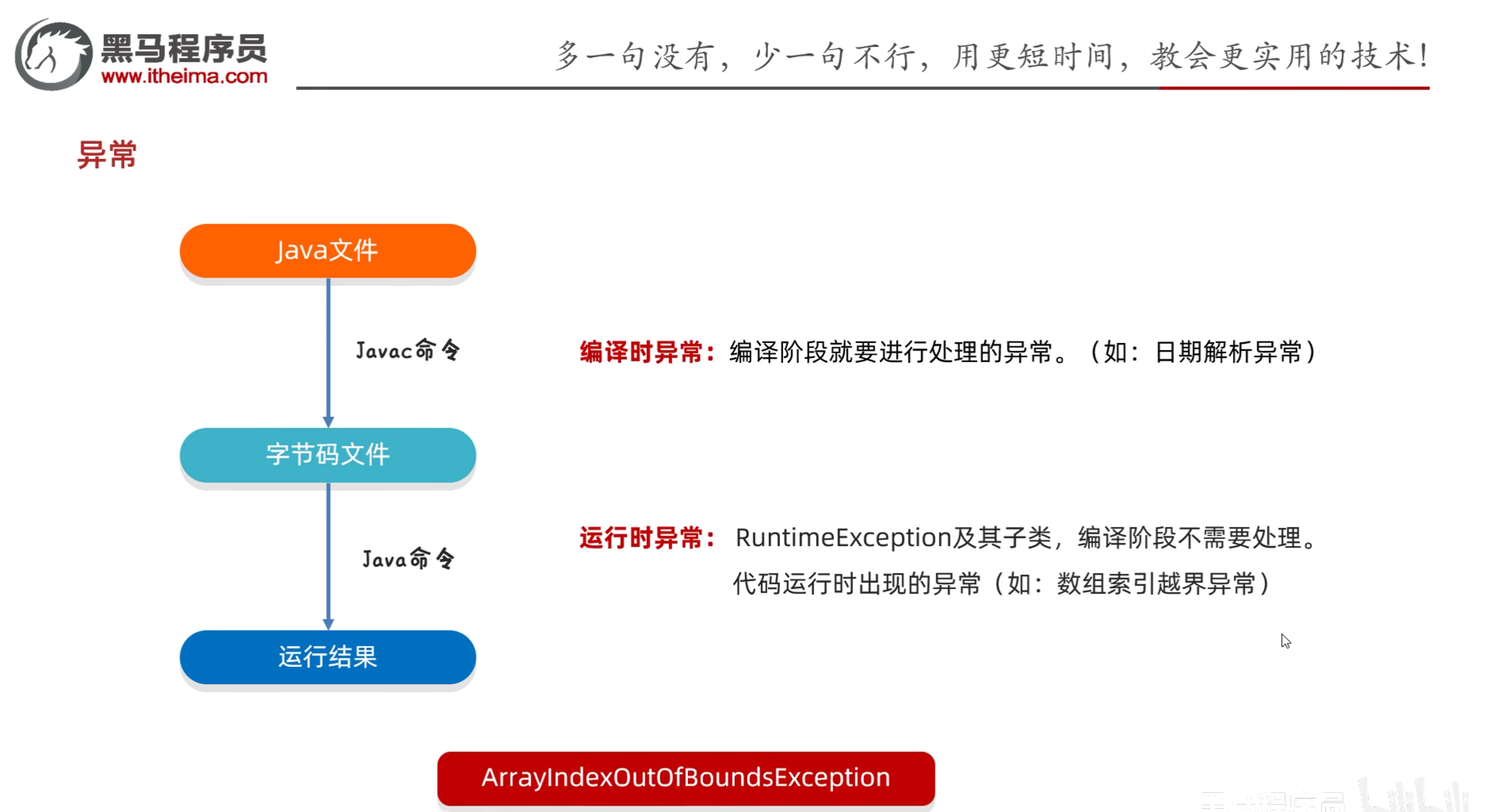
编译时异常:除了RuntimeException及其子类,其他的异常都是编译时异常。编译阶段需要进行处理,作用在于提醒程序员
运行时异常:RuntimeException及其子类,编译阶段不需要处理,运行时出现的异常。
1.3 异常的作用
作用一:异常是用来查询bug的关键参考信息
作用二:异常可以作为方法内部的一种特殊返回值,以便通知调用者底层的执行情况
示例:
1
2
3
4
5
6
7
8
9
10
11
12
13
14
15
16
17
18
19
20
21
22
23
24
25
26
27
28
29
30
31
32
33
34
35
36
37
38
39
40
41
42
43
44
45
46
47
48
49
50
51
52
53
54
public class Student { private String name; private int age; public Student () { } public Student (String name, int age) { this .name = name; this .age = age; } public String getName () { return name; } public void setName (String name) { this .name = name; } public int getAge () { return age; } public void setAge (int age) { if (age < 18 || age > 40 ) { throw new RuntimeException (); }else { this .age = age; } } public String toString () { return "Student{name = " + name + ", age = " + age + "}" ; } }
1
2
3
4
5
6
7
8
9
10
11
public class Main { public static void main (String[] args) { Student s = new Student (); s.setAge(50 ); } }
1.4 异常的处理方式
异常的处理方式:
JVM默认的处理方式
自己处理(捕获异常)
抛出异常
1.4.1 JVM默认的处理方式
把异常的名称,异常原因以及异常出现的位置等信息输出在了控制台上
程序停止执行,下面的代码不再执行
1.4.2 自己处理(捕获异常)
1
2
3
4
5
6
7
try { } catch (异常类型 变量名) { } finally { }
目的:当代码出现异常时,可以让程序继续执行下去,而不是停止执行
示例:
1
2
3
4
5
6
7
8
9
10
11
12
13
14
15
16
17
18
19
public class ExceptionDemo2 { public static void main (String[] args) { int [] arr = {1 , 2 , 3 , 4 , 5 }; try { System.out.println(arr[10 ]); }catch (ArrayIndexOutOfBoundsException e){ System.out.println("索引越界" ); } System.out.println("是否执行了" ); } }
四个问题:
如果try中没有遇到问题,怎么执行?
如果try中遇到多个问题,怎么执行?
如果我们要捕获多个异常,这些异常如果存在父子关系的话,那么父类一定要写在下面(因为多态的关系,子类都满足父类的类型,所以不会往下执行)
用多个catch也不能捕获多个异常,会在捕获第一个异常时跳出
JDK7之后,一个catch中可以写多个异常,使用|分隔开,注意:多个异常的catch中不能有相同的代码
如果try中遇到的问题没有被捕获,怎么执行?
如果try中遇到了问题,那么try下面的其它代码还会执行吗?
1.5 Throwable的成员方法
public String getMessage():返回此throwable的详细消息字符串
public String toString():返回此可抛出的简短描述
public void printStackTrace():把异常的错误信息输出在控制台上
示例:
1
2
3
4
5
6
7
8
9
10
11
12
13
14
15
16
17
18
19
20
21
22
23
24
public class ExceptionDemo3 { public static void main (String[] args) { int [] arr = {1 , 2 , 3 , 4 , 5 }; try { System.out.println(arr[10 ]); } catch (ArrayIndexOutOfBoundsException e) { e.printStackTrace(); } System.out.println("看看我执行了吗" ); } }
1.6 抛出处理
throws:写在方法定义处,表示声明一个异常。告诉调用者使用本方法可能会有哪些异常
格式:1 2 3 public void method () throws 异常类型1 , 异常类型2 , ... { }
编译时异常:必须要写
运行时异常:可以不写
throw:写在方法内,结束方法。手动抛出异常对象交给调用者。方法中下面的代码不再执行
格式:1 2 3 4 public void method () { throw new NullPointerException (); }
示例:
1 2 3 4 5 6 7 8 9 10 11 12 13 14 15 16 17 18 19 20 21 22 23 24 25 26 27 28 29 30 31 32 33 34 35 36 public class Exception4 { public static void main (String[] args) { int [] arr = {}; int max = 0 ; try { max = getMx(arr); } catch (NullPointerException e) { System.out.println("空指针异常" ); } catch (ArrayIndexOutOfBoundsException e) { System.out.println("索引越界异常" ); } System.out.println(max); } public static int getMx (int [] arr) { if (arr == null ) { throw new NullPointerException (); } if (arr.length == 0 ) { throw new ArrayIndexOutOfBoundsException (); } System.out.println("看看我执行了吗" ); int max = arr[0 ]; for (int i = 1 ; i < arr.length; i++) { if (max < arr[i]) { max = arr[i]; } } return max; } }
1.7 练习
需求:
键盘录入自己心仪的女朋友的姓名和年龄
姓名的长度在3~10之间
年龄的范围在18~40岁
超出这个范围是异常数据不能赋值,需重新录入,一直录到正确为止
需要考虑用户在键盘录入时的所有情况
比如:录入年龄超出范围,录入姓名时录入了abc等情况
1 2 3 4 5 6 7 8 9 10 11 12 13 14 15 16 17 18 19 20 21 22 23 24 25 26 27 28 29 30 31 32 33 34 35 36 37 38 39 40 41 42 43 44 45 46 47 48 49 50 51 52 53 54 55 56 57 public class GirlFriend { private String name; private int age; public GirlFriend () { } public GirlFriend (String name, int age) { this .name = name; this .age = age; } public String getName () { return name; } public void setName (String name) { int len = name.length(); if (len < 3 || len > 10 ) { throw new RuntimeException (); } this .name = name; } public int getAge () { return age; } public void setAge (int age) { if (age < 18 || age > 40 ) { throw new RuntimeException (); } this .age = age; } public String toString () { return "GirlFriend{name = " + name + ", age = " + age + "}" ; } }
1 2 3 4 5 6 7 8 9 10 11 12 13 14 15 16 17 18 19 20 21 22 23 24 25 26 27 28 29 30 import java.util.Scanner;public class Test { public static void main (String[] args) { Scanner sc = new Scanner (System.in); GirlFriend girlFriend = new GirlFriend (); while (true ) { try { System.out.println("请输入女朋友的名字:" ); String name = sc.nextLine(); girlFriend.setName(name); System.out.println("请输入女朋友的年龄:" ); String ageStr = sc.nextLine(); int age = Integer.parseInt(ageStr); girlFriend.setAge(age); break ; } catch (NumberFormatException e) { System.out.println("年龄的格式有误,请输入数字" ); } catch (RuntimeException e) { System.out.println("姓名的长度或年龄的范围有误" ); } } System.out.println(girlFriend); } }
1.8 自定义异常
步骤:
定义异常类
写继承关系
空参构造
带参构造
示例:
1 2 3 4 5 6 7 8 9 10 11 12 13 14 15 16 17 public class NameFormatException extends RuntimeException { public NameFormatException () { } public NameFormatException (String message) { super (message); } }
1 2 3 4 5 6 7 8 9 public class AgeOutOfBoundException extends RuntimeException { public AgeOutOfBoundException () { } public AgeOutOfBoundException (String message) { super (message); } }
1 2 3 4 5 6 7 8 9 10 11 12 13 14 15 16 17 18 19 20 21 22 23 24 25 26 27 28 29 30 31 32 33 34 35 36 37 38 39 40 41 42 43 44 45 46 47 48 49 50 51 52 53 54 55 56 57 public class GirlFriend { private String name; private int age; public GirlFriend () { } public GirlFriend (String name, int age) { this .name = name; this .age = age; } public String getName () { return name; } public void setName (String name) { int len = name.length(); if (len < 3 || len > 10 ) { throw new NameFormatException (name + "格式有误,长度应该为 3~10" ); } this .name = name; } public int getAge () { return age; } public void setAge (int age) { if (age < 18 || age > 40 ) { throw new AgeOutOfBoundException (age + "不在 18~40" ); } this .age = age; } public String toString () { return "GirlFriend{name = " + name + ", age = " + age + "}" ; } }
1 2 3 4 5 6 7 8 9 10 11 12 13 14 15 16 17 18 19 20 21 22 23 24 25 26 27 28 29 30 31 32 import java.util.Scanner;public class Test { public static void main (String[] args) { Scanner sc = new Scanner (System.in); GirlFriend girlFriend = new GirlFriend (); while (true ) { try { System.out.println("请输入女朋友的名字:" ); String name = sc.nextLine(); girlFriend.setName(name); System.out.println("请输入女朋友的年龄:" ); String ageStr = sc.nextLine(); int age = Integer.parseInt(ageStr); girlFriend.setAge(age); break ; } catch (NumberFormatException e) { e.printStackTrace(); } catch (NameFormatException e) { e.printStackTrace(); } catch (AgeOutOfBoundException e) { e.printStackTrace(); } } System.out.println(girlFriend); } }
2025.04.18
二、File类
File对象就表示一个路径,可以是文件的路径,也可以是文件夹的路径
这个路径可以是存在的,也可以是不存在的
2.1 File类的构造方法
public File(String pathname):根据文件路径创建文件对象
public File(String parent, String child):根据父路径名字符串和子路径名字符串创建文件对象
public File(File parent, String child):根据父路径对应文件对象和子路径名字符串创建文件对象
示例:
1 2 3 4 5 6 7 8 9 10 11 12 13 14 15 16 17 18 19 20 21 22 23 import java.io.File;public class FileDemo1 { public static void main (String[] args) { String str = "C:\\Users\\alienware\\Desktop\\a.txt" ; File f1 = new File (str); System.out.println(f1); String parent = "C:\\Users\\alienware\\Desktop" ; String child = "a.txt" ; File f2 = new File (parent, child); System.out.println(f2); File parent2 = new File ("C:\\Users\\alienware\\Desktop" ); String child2 = "a.txt" ; File f3 = new File (parent2, child2); System.out.println(f3); } }
2.2 File类的常用成员方法
判断、获取
public boolean isDirectory():判断是否是文件夹
public boolean isFile():判断是否是文件
public boolean exists():判断文件或文件夹是否存在
public long length():获取文件的大小,单位是字节
public String getAbsolutePath():获取绝对路径
public String getPath():获取相对路径
public String getName():获取文件或文件夹的名字
public long lastModified():获取文件的最后修改时间,单位是毫秒
创建、删除
public boolean createNewFile():创建文件,返回值表示是否创建成功
public boolean mkdir():创建文件夹,返回值表示是否创建成功
public boolean mkdirs():创建多级文件夹,返回值表示是否创建成功
public boolean delete():删除文件或文件夹,返回值表示是否删除成功
获取并遍历
public File[] listFiles():获取当前文件夹下的所有文件和文件夹,返回值是File数组
当调用者File表示的路径不存在时,返回null
当调用者File表示的路径是文件时,返回null
当调用者File表示的路径是一个空文件夹时,返回一个长度为0的数组
当调用者File表示的路径是一个非空文件夹时,将里面所有文件和文件夹的路径放在File数组中返回
当调用者File表示的路径是一个有隐藏文件的文件夹时,将里面的所有文件和文件夹的路径放在File数组中返回,包含隐藏文件
当调用者File表示的路径是需要权限才能访问的文件夹时,返回null
public static File[] listRoots():获取所有的根目录,返回值是File数组
public String[] list():获取当前文件夹下的所有文件和文件夹
public String[] list(FilenameFilter filter):获取当前文件夹下的所有文件和文件夹,返回值是String数组
filter:过滤器,过滤器的作用是对文件进行筛选,筛选出符合条件的文件
filter.accept(File dir, String name):dir表示当前文件夹,name表示当前文件夹下的每一个文件名,如果返回true就表示符合条件,false表示不符合条件
filter可以是匿名内部类,也可以是Lambda表达式
public File[] listFiles():获取当前文件夹下的所有文件和文件夹,返回值是File数组
public File[] listFiles(FileFilter filter):利用文件名过滤器获取当前路径下的所有内容
public File listFiles(FilenameFilter filter):利用文件名过滤器获取当前路径下的所有内容
2.3 练习
2.3.1 创建文件夹
在当前模块下的aaa文件夹中创建一个a.txt文件
代码实现:
1 2 3 4 5 6 7 8 9 10 11 12 13 14 15 16 17 18 19 20 public class Test1 { public static void main (String[] args) throws IOException { File file = new File ("myfile\\aaa" ); file.mkdirs(); File src = new File (file,"a.txt" ); boolean b = src.createNewFile(); if (b){ System.out.println("创建成功" ); }else { System.out.println("创建失败" ); } } }
2.3.2 查找文件(不考虑子文件夹)
定义一个方法找某一个文件夹中,是否有以avi结尾的电影(暂时不需要考虑子文件夹)
代码示例:
1 2 3 4 5 6 7 8 9 10 11 12 13 14 15 16 17 18 19 20 21 22 23 24 25 26 27 28 29 30 public class Test2 { public static void main (String[] args) { File file = new File ("D:\\aaa\\bbb" ); boolean b = haveAVI(file); System.out.println(b); } public static boolean haveAVI (File file) { File[] files = file.listFiles(); for (File f : files) { if (f.isFile() && f.getName().endsWith(".avi" )){ return true ; } } return false ; } }
2.3.3(考虑子文件夹)
找到电脑中所有以avi结尾的电影。(需要考虑子文件夹)
代码示例:
1 2 3 4 5 6 7 8 9 10 11 12 13 14 15 16 17 18 19 20 21 22 23 24 25 26 27 28 29 30 31 32 33 34 35 36 37 38 39 40 41 42 43 44 45 46 47 public class Test3 { public static void main (String[] args) { findAVI(); } public static void findAVI () { File[] arr = File.listRoots(); for (File f : arr) { findAVI(f); } } public static void findAVI (File src) { File[] files = src.listFiles(); if (files != null ){ for (File file : files) { if (file.isFile()){ String name = file.getName(); if (name.endsWith(".avi" )){ System.out.println(file); } }else { findAVI(file); } } } } }
2.3.4 删除多级文件夹
需求: 如果我们要删除一个有内容的文件夹 1.先删除文件夹里面所有的内容 2.再删除自己
代码示例:
1 2 3 4 5 6 7 8 9 10 11 12 13 14 15 16 17 18 19 20 21 22 23 24 25 26 27 28 29 30 31 32 33 34 35 36 public class Test4 { public static void main (String[] args) { File file = new File ("D:\\aaa\\src" ); delete(file); } public static void delete (File src) { File[] files = src.listFiles(); for (File file : files) { if (file.isFile()){ file.delete(); }else { delete(file); } } src.delete(); } }
2.3.5 统计大小
需求:统计一个文件夹的总大小
代码示例:
1 2 3 4 5 6 7 8 9 10 11 12 13 14 15 16 17 18 19 20 21 22 23 24 25 26 27 28 29 30 31 32 33 34 35 36 37 38 39 40 41 42 43 public class Test5 { public static void main (String[] args) { File file = new File ("D:\\aaa\\src" ); long len = getLen(file); System.out.println(len); } public static long getLen (File src) { long len = 0 ; File[] files = src.listFiles(); for (File file : files) { if (file.isFile()){ len = len + file.length(); }else { len = len + getLen(file); } } return len; } }
2.3.6 统计文件个数
需求:统计一个文件夹中每种文件的个数并打印。(考虑子文件夹) 打印格式如下: txt:3个 doc:4个 jpg:6个
代码示例:
1 2 3 4 5 6 7 8 9 10 11 12 13 14 15 16 17 18 19 20 21 22 23 24 25 26 27 28 29 30 31 32 33 34 35 36 37 38 39 40 41 42 43 44 45 46 47 48 49 50 51 52 53 54 55 56 57 58 59 60 61 62 63 64 65 66 67 68 69 70 71 72 73 74 75 76 77 78 79 public class Test6 { public static void main (String[] args) throws IOException { File file = new File ("D:\\aaa\\src" ); HashMap<String, Integer> hm = getCount(file); System.out.println(hm); } public static HashMap<String,Integer> getCount(File src){ HashMap<String,Integer> hm = new HashMap <>(); File[] files = src.listFiles(); for (File file : files) { if (file.isFile()){ String name = file.getName(); String[] arr = name.split("\\." ); if (arr.length >= 2 ){ String endName = arr[arr.length - 1 ]; if (hm.containsKey(endName)){ int count = hm.get(endName); count++; hm.put(endName,count); }else { hm.put(endName,1 ); } } }else { HashMap<String, Integer> sonMap = getCount(file); Set<Map.Entry<String, Integer>> entries = sonMap.entrySet(); for (Map.Entry<String, Integer> entry : entries) { String key = entry.getKey(); int value = entry.getValue(); if (hm.containsKey(key)){ int count = hm.get(key); count = count + value; hm.put(key,count); }else { hm.put(key,value); } } } } return hm; } }
参考资料:黑马程序员Java零基础视频教程_下部