2025.04.20
Java IO流
一、IO流概述
1.1 IO流的概念
- File:表示系统中的文件或者文件夹路径,File类只能对文件本身进行操作,不能读写文件里面存储的数据
- IO流:用于读写文件中的数据(可以读写文件,或网络中的数据)
1.2 IO流的分类
- IO流的分类
- 按流的方向
- 输入流:从外部读取数据到程序中
- 输出流:将数据从程序中输出到外部
- 按操作文件类型
- 字节流:以字节为单位读写数据,适合处理所有类型的文件(图片、音频、视频等)
- 字符流:以字符为单位读写数据,适合处理文本文件(文本文件、Word文档等)
二、字节流
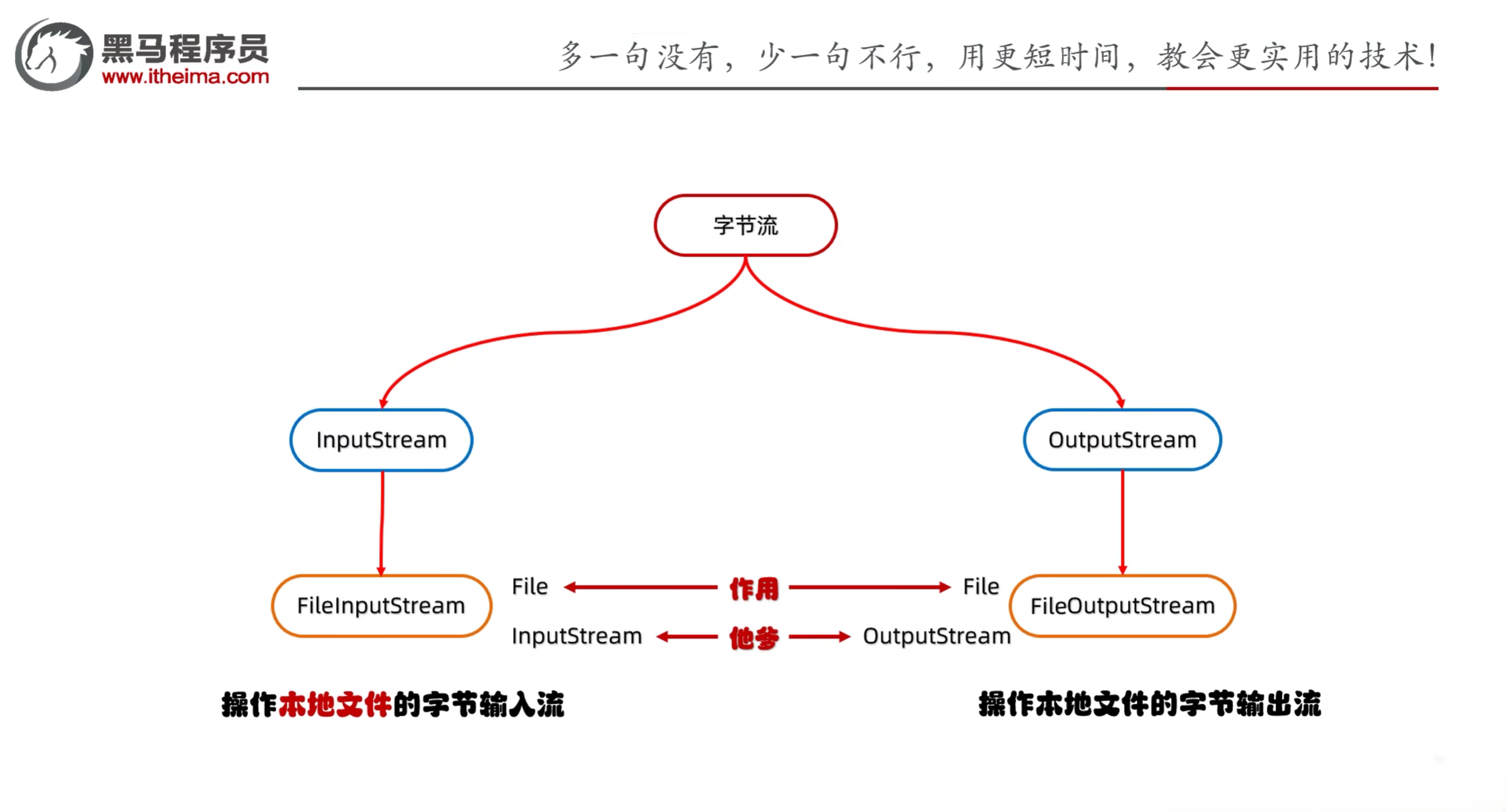
- 字节流分为字节输入流和字节输出流
- 字节输入流:InputStream
- 字节输出流:OutputStream
2.1 字节输出流
- 字节输出流的父类是OutputStream,所有的字节输出流都继承自OutputStream类
- FileOutputStream:操作本地文件的字节输出流,可以把程序中的数据写到本地文件中
- 书写步骤
- 创建字节输出流对象
- 细节1:参数是字符串表示的路径或者是File对象都是可以的
- 细节2:如果路径不存在,系统会自动创建一个新的文件,但是要保证父级目录存在
- 细节3:如果文件已经存在,则会清空文件内容,重新写入数据
- 写数据
- write方法的参数是整数,但是实际上写到本地文件中的是整数在ASCII上对应的字符
- 释放资源
示例:
1
2
3
4
5
6
7
8
9
10
11
12
13
14
15
16
| import java.io.File;
import java.io.FileNotFoundException;
import java.io.FileOutputStream;
import java.io.IOException;
public class IOStreamDemo1 {
public static void main(String[] args) throws IOException {
FileOutputStream fos = new FileOutputStream("a.txt");
fos.write(111);
fos.close();
}
}
|
- FileOutputStream写数据的3种方式
- void write(int b):一次写一个字节数据
- void write(byte[] b):一次写一个字节数组数据
- void write(byte[] b, int off, int len):一次写一个字节数组数据的一部分,off表示偏移量,len表示长度
示例:
1
2
3
4
5
6
7
8
9
10
11
12
13
14
15
16
17
18
19
20
21
| import java.io.FileNotFoundException;
import java.io.FileOutputStream;
import java.io.IOException;
public class IOStreamDemo2 {
public static void main(String[] args) throws IOException {
FileOutputStream fos = new FileOutputStream("a.txt");
byte[] bytes = {97, 98, 99, 100};
fos.write(bytes, 0, bytes.length - 1);
fos.close();
}
}
|
- FileOutputStream写数据的两个小问题
- 换行写
- 再次写出一个换行符就可以了
- windows系统:\r\n
- Linux系统:\n
- Mac系统:\r
- 续写
- FileOutputStream的构造方法有一个参数可以设置是否续写,默认是false
- 如果设置为true,则会在原有文件的基础上进行续写,而不是清空文件内容重新写入
示例:
1
2
3
4
5
6
7
8
9
10
11
12
13
14
15
16
17
18
19
20
21
| import java.io.FileOutputStream;
import java.io.IOException;
public class IOStreamDemo3 {
public static void main(String[] args) throws IOException {
FileOutputStream fos = new FileOutputStream("a.txt", true);
String str = "HelloWorld";
byte[] bytes = str.getBytes();
fos.write(bytes);
String wrap = "\r\n";
fos.write(wrap.getBytes());
String str2 = "666";
byte[] bytes2 = str2.getBytes();
fos.write(bytes2);
fos.close();
}
}
|
2.2 字节输入流
- FileInputStream:操作本地文件的字节输入流,可以把本地文件中的数据读到程序中
- 书写步骤
- 创建字节输入流对象
- 如果文件不存在,系统会报错FileNotFoundException异常
- 读数据
- 细节1:一次读一个字节,读出来的是数据在ASCII上对应的数字
- 细节2:如果读到文件末尾,返回-1
- 释放资源
示例:
1
2
3
4
5
6
7
8
9
10
11
12
13
14
15
16
17
18
19
| import java.io.FileInputStream;
import java.io.FileNotFoundException;
import java.io.IOException;
public class IOStreamDemo4 {
public static void main(String[] args) throws IOException {
FileInputStream fis = new FileInputStream("a.txt");
int b1 = fis.read();
System.out.println(b1);
fis.close();
}
}
|
示例:
1
2
3
4
5
6
7
8
9
10
11
12
13
14
15
16
17
18
19
20
21
| import java.io.FileInputStream;
import java.io.FileNotFoundException;
import java.io.IOException;
public class IOStreamDemo4 {
public static void main(String[] args) throws IOException {
FileInputStream fis = new FileInputStream("a.txt");
int b;
while ((b = fis.read()) != -1) {
System.out.print((char) b);
}
fis.close();
}
}
|
2.3 文件拷贝
示例:
1
2
3
4
5
6
7
8
9
10
11
12
13
14
15
16
17
18
19
20
21
22
23
| import java.io.FileInputStream;
import java.io.FileNotFoundException;
import java.io.FileOutputStream;
import java.io.IOException;
public class IOStreamDemo5 {
public static void main(String[] args) throws IOException {
FileInputStream fis = new FileInputStream("D:\\itheima\\movie.mp4");
FileOutputStream fos = new FileOutputStream("myio\\copy.mp4");
int b;
while ((b = fis.read()) != -1){
fos.write(b);
}
fos.close();
fis.close();
}
}
|
- FileInputStream读取的问题
- IO流:如果拷贝的文件过大,那么速度会很慢
- 原因:每次读一个字节,效率低
- FileInputStream一次读取多个字节
- public int read():一次读取一个字节数据
- public int read(byte[] buffer):一次读取一个字节数组数据,返回读取到的字节数
- public int read(byte[] buffer, int off, int len):一次读取一个字节数组数据的一部分,返回读取到的字节数,off表示偏移量,len表示长度
示例:
1
2
3
4
5
6
7
8
9
10
11
12
13
14
15
16
17
18
19
20
21
22
23
| import java.io.FileInputStream;
import java.io.FileNotFoundException;
import java.io.FileOutputStream;
import java.io.IOException;
public class IOStreamDemo5 {
public static void main(String[] args) throws IOException {
FileInputStream fis = new FileInputStream("D:\\itheima\\movie.mp4");
FileOutputStream fos = new FileOutputStream("myio\\copy.mp4");
int len;
byte[] buffer = new byte[1024 * 1024 * 5];
while ((len = fis.read(buffer)) != -1) {
fos.write(buffer, 0, len);
}
fos.close();
fis.close();
}
}
|
2.4 IO流中捕获异常
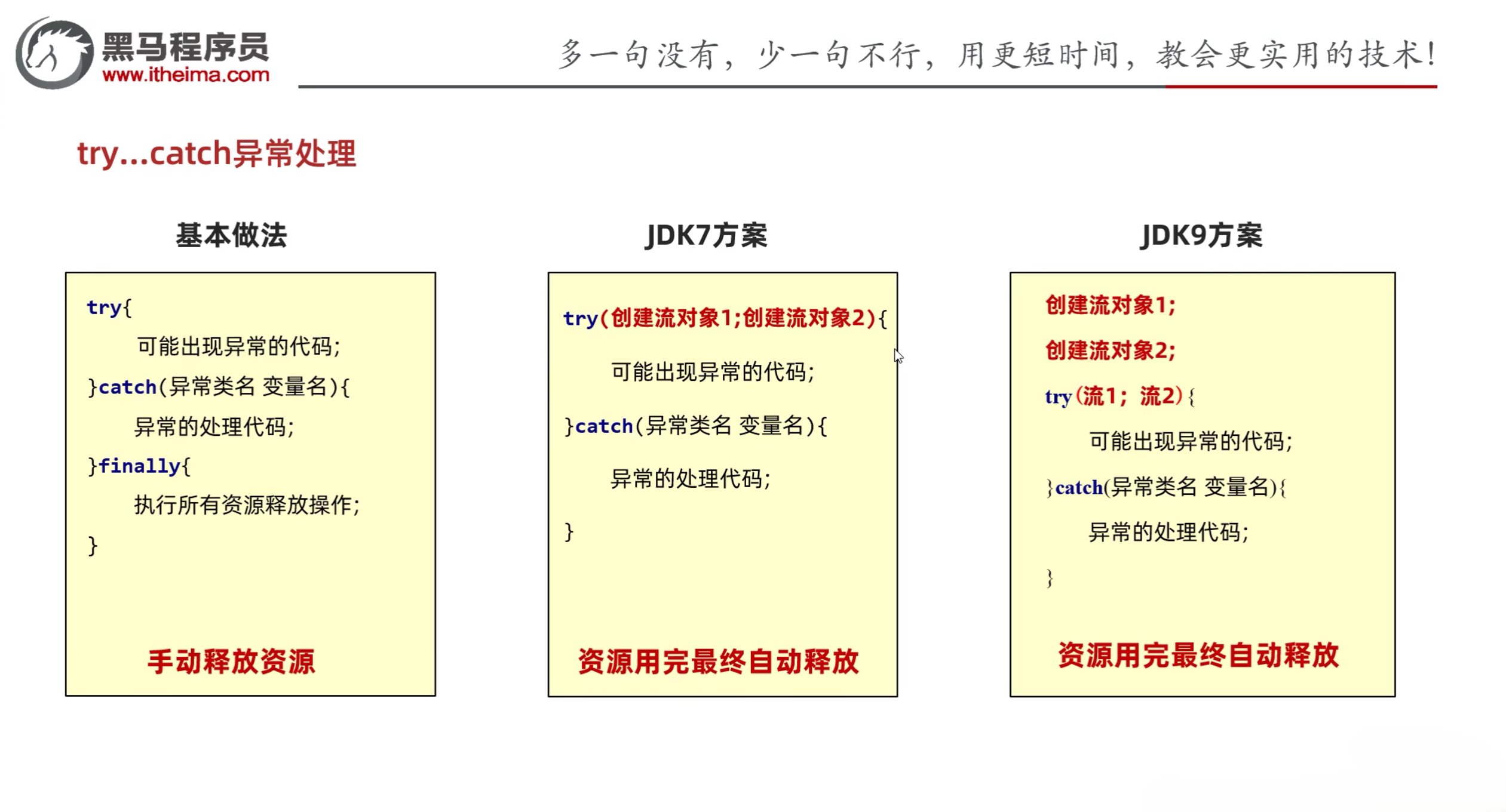
- IO流中捕获异常的两种方式
- throws:在方法上抛出异常,调用者处理异常
- try-catch:在方法中捕获异常,自己处理异常
- finally:无论是否发生异常,都会执行的代码块,通常用于释放资源
- try-catch-finally的语法格式
1
2
3
4
5
6
7
| try {
} catch (Exception e) {
} finally {
}
|
示例:
1
2
3
4
5
6
7
8
9
10
11
12
13
14
15
16
17
18
19
20
21
22
23
24
25
26
27
28
29
30
31
32
33
34
35
36
37
38
39
40
41
42
43
44
45
| import java.io.FileInputStream;
import java.io.FileNotFoundException;
import java.io.FileOutputStream;
import java.io.IOException;
public class IOStreamDemo5 {
public static void main(String[] args) throws IOException {
FileOutputStream fos = null;
FileInputStream fis = null;
try {
fis = new FileInputStream("D:\\itheima\\movie.mp4");
fos = new FileOutputStream("myio\\copy.mp4");
int len;
byte[] buffer = new byte[1024 * 1024 * 5];
while ((len = fis.read(buffer)) != -1) {
fos.write(buffer, 0, len);
}
} catch (IOException e) {
e.printStackTrace();
} finally {
if (fos != null) {
try {
fos.close();
} catch (IOException e) {
e.printStackTrace();
}
}
if (fis != null) {
try {
fis.close();
} catch (IOException e) {
e.printStackTrace();
}
}
}
}
}
|
- 简化方案
- 接口:AutoCloseable,表示可以自动关闭的资源
示例:
JDK7
1
2
3
4
5
6
7
8
9
10
11
12
13
14
15
16
17
18
19
20
21
| import java.io.FileInputStream;
import java.io.FileOutputStream;
import java.io.IOException;
public class IOStreamDemo6 {
public static void main(String[] args) {
try(FileInputStream fis = new FileInputStream("D:\\itheima\\movie.mp4");
FileOutputStream fos = new FileOutputStream("myio\\copy.mp4")){
int len;
byte[] buffer = new byte[1024 * 1024 * 5];
while ((len = fis.read(buffer)) != -1) {
fos.write(buffer, 0, len);
}
}catch (IOException e){
e.printStackTrace();
}
}
}
|
JDK9
1
2
3
4
5
6
7
8
9
10
11
12
13
14
15
16
17
18
19
20
21
| import java.io.FileInputStream;
import java.io.FileNotFoundException;
import java.io.FileOutputStream;
import java.io.IOException;
public class IOStreamDemo6 {
public static void main(String[] args) throws FileNotFoundException {
FileInputStream fis = new FileInputStream("D:\\itheima\\movie.mp4");
FileOutputStream fos = new FileOutputStream("myio\\copy.mp4");
try (fis; fos) {
int len;
byte[] buffer = new byte[1024 * 1024 * 5];
while ((len = fis.read(buffer)) != -1) {
fos.write(buffer, 0, len);
}
} catch (IOException e) {
e.printStackTrace();
}
}
}
|
三、字符流
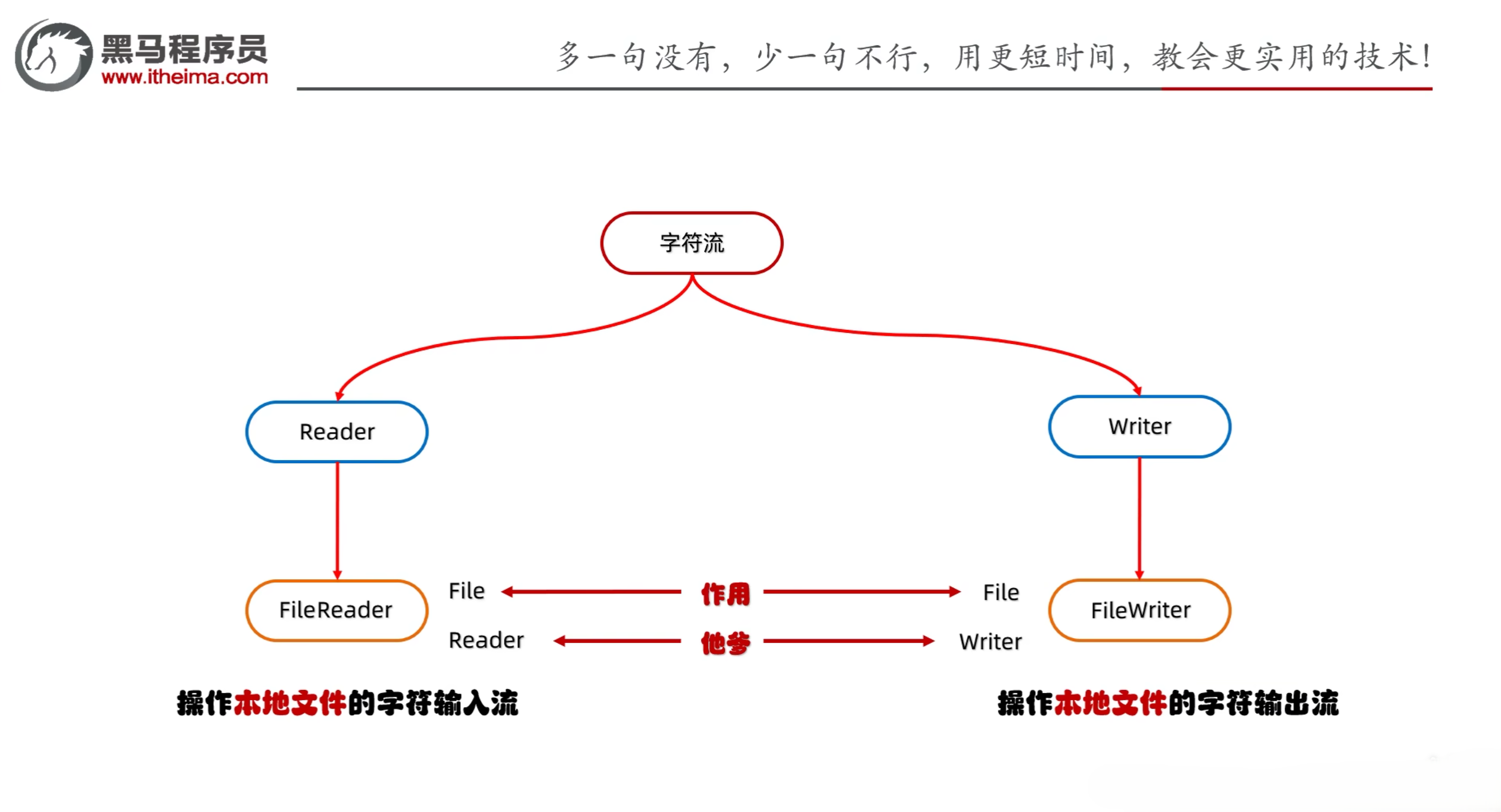
- 字符流分为字符输入流和字符输出流
- 字符输入流:Reader
- 字符输出流:Writer
3.1 字符集
- 字符集:字符和字节之间的映射关系
- 字符集的分类
- ASCII:美国标准信息交换码,7位编码,128个字符(英文字母、数字、标点符号)
- GB2312:国标字符集,双字节编码,6763个字符(汉字、日文、韩文等)
- BIG5:国标扩展字符集,双字节编码,32768个字符(汉字、日文、韩文等)
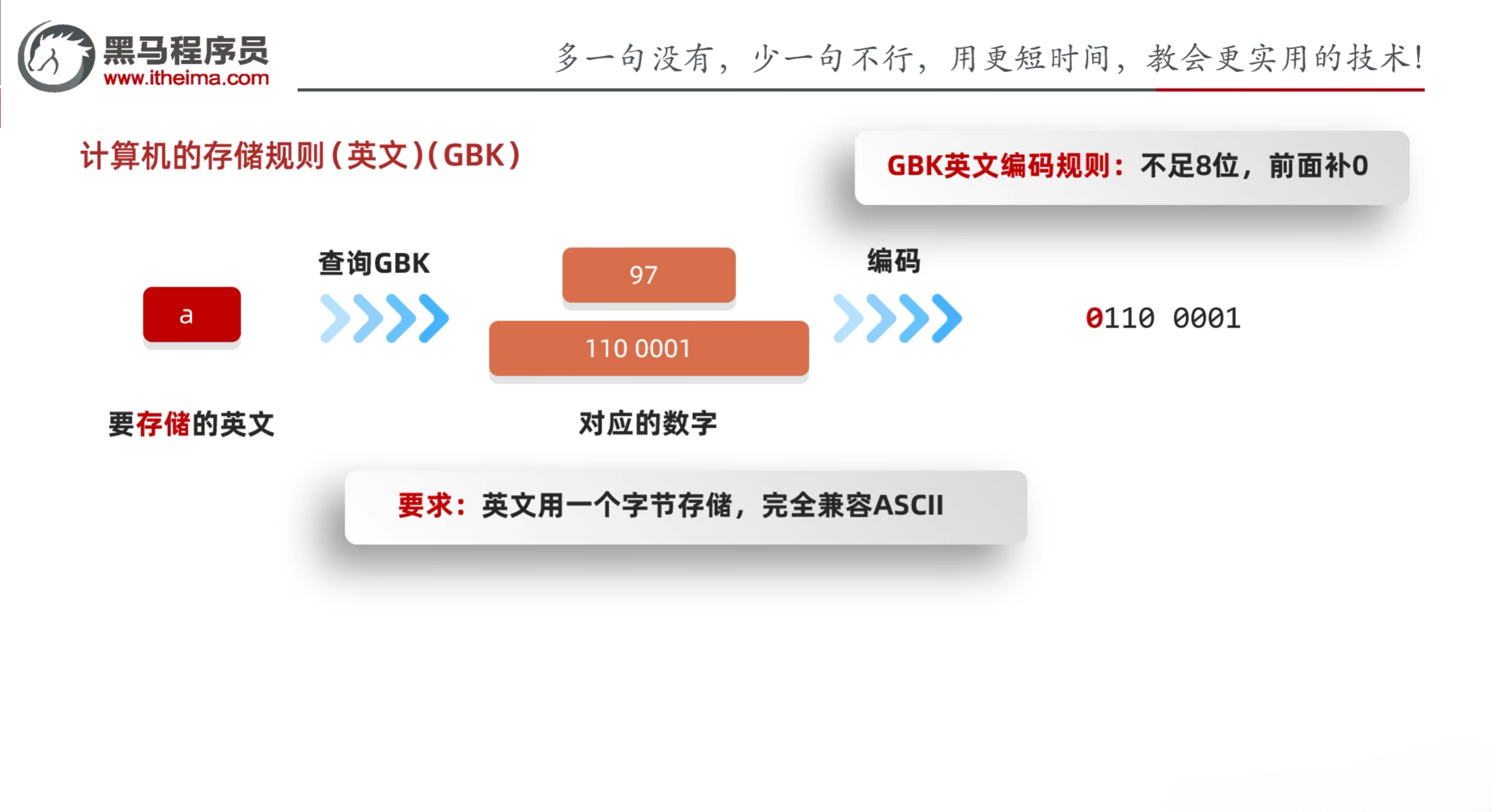
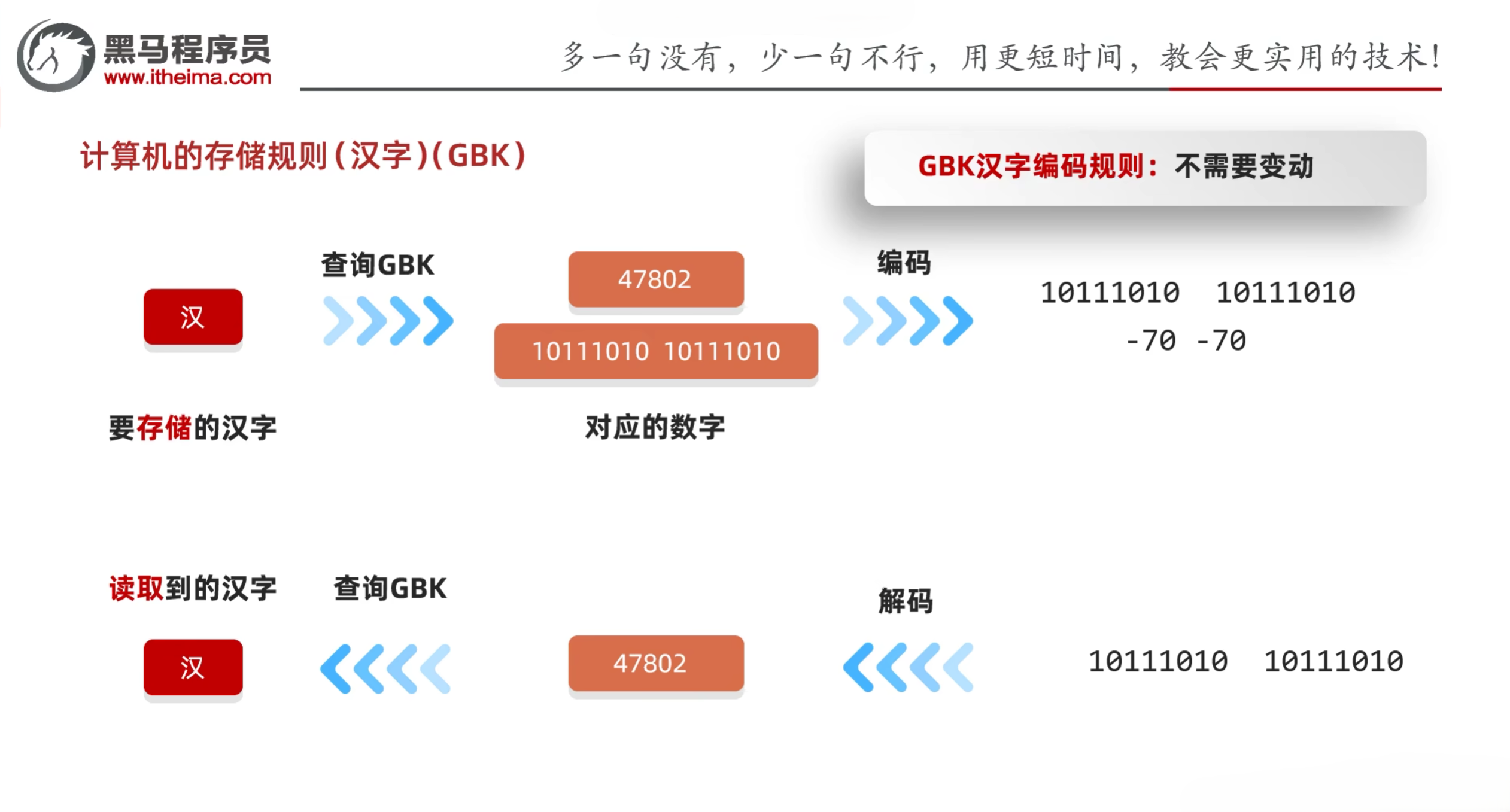
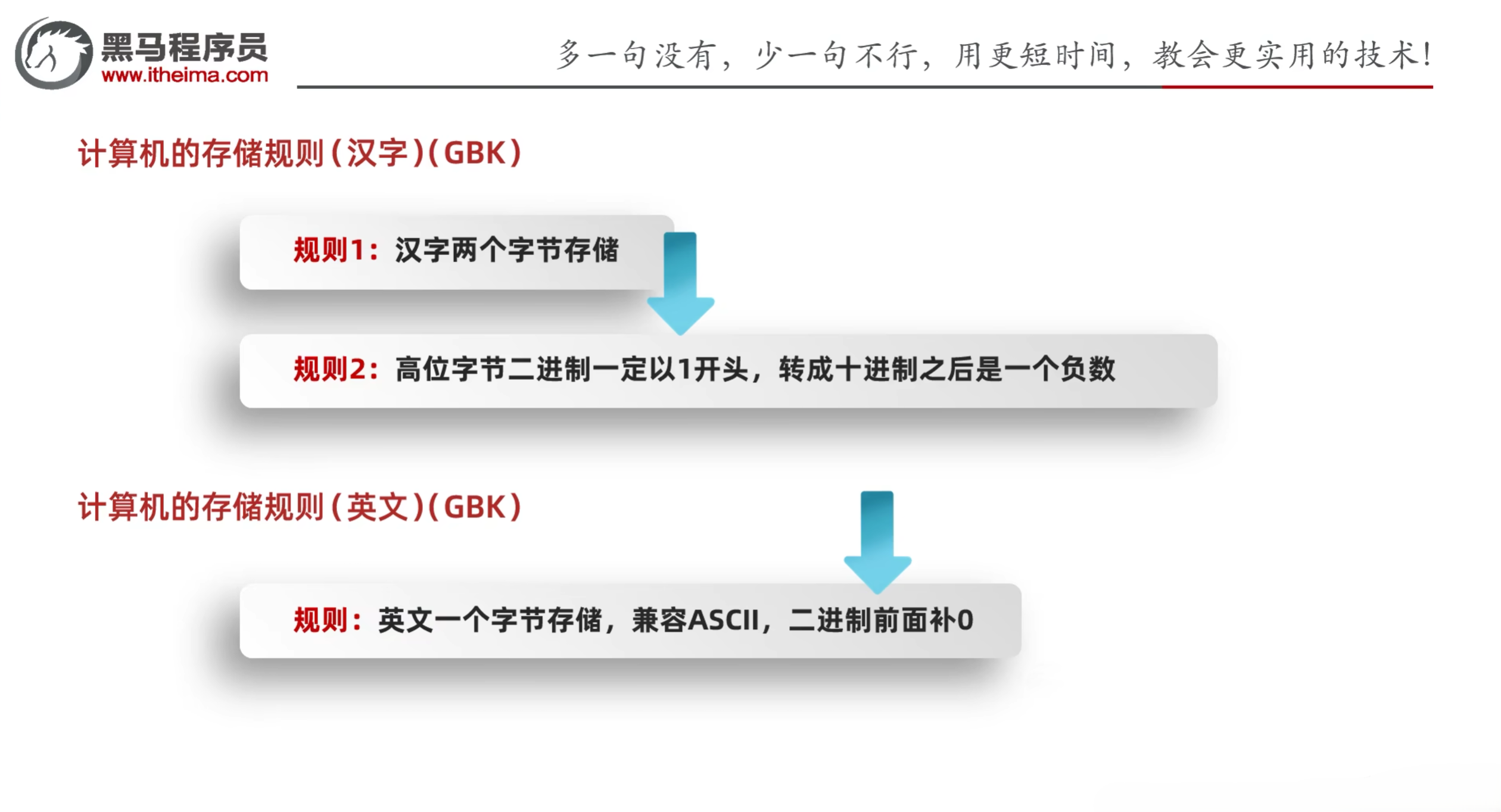
- GBK:国标扩展字符集,双字节编码,65536个字符(汉字、日文、韩文等),系统显示:ANSI
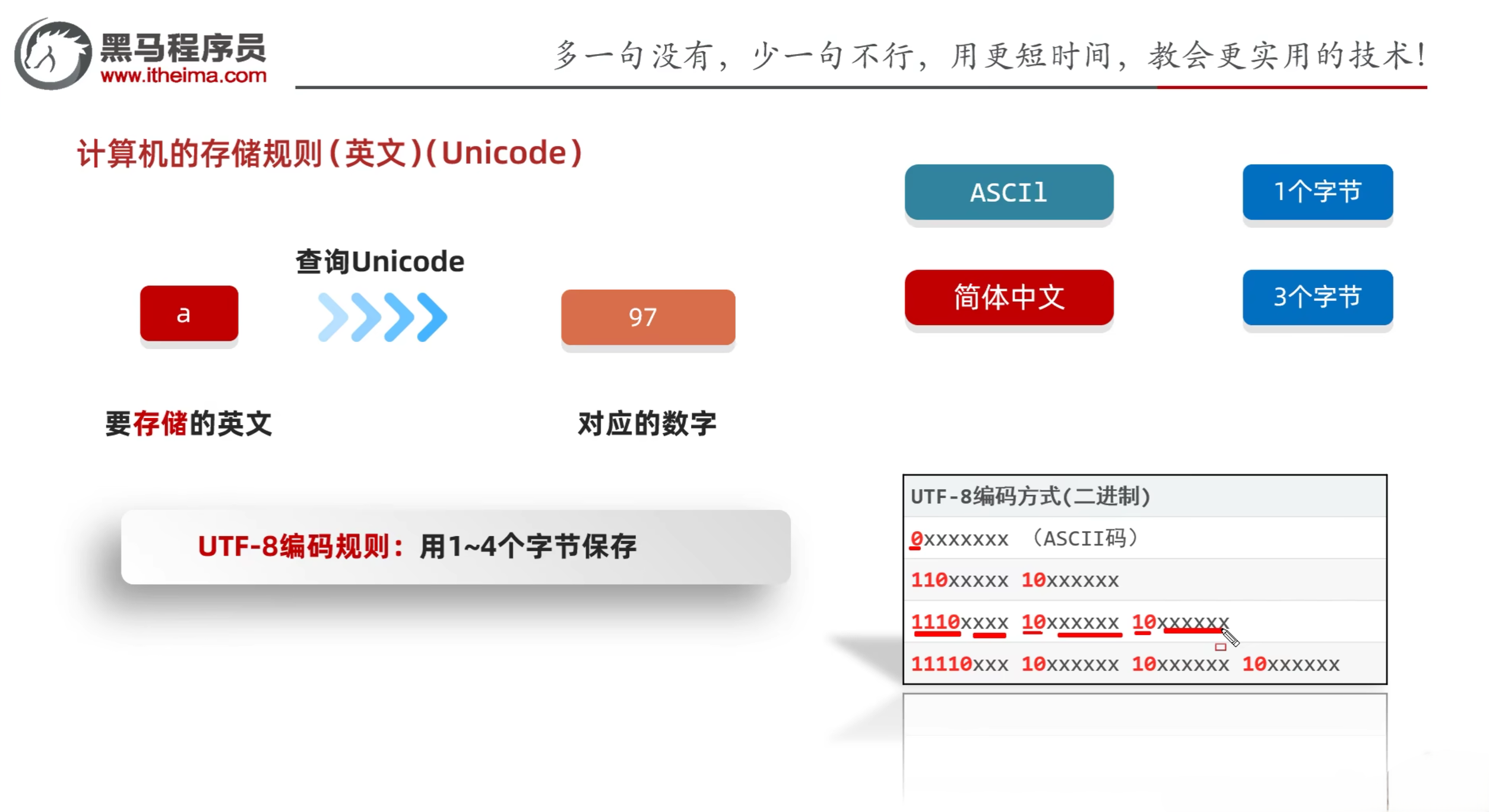
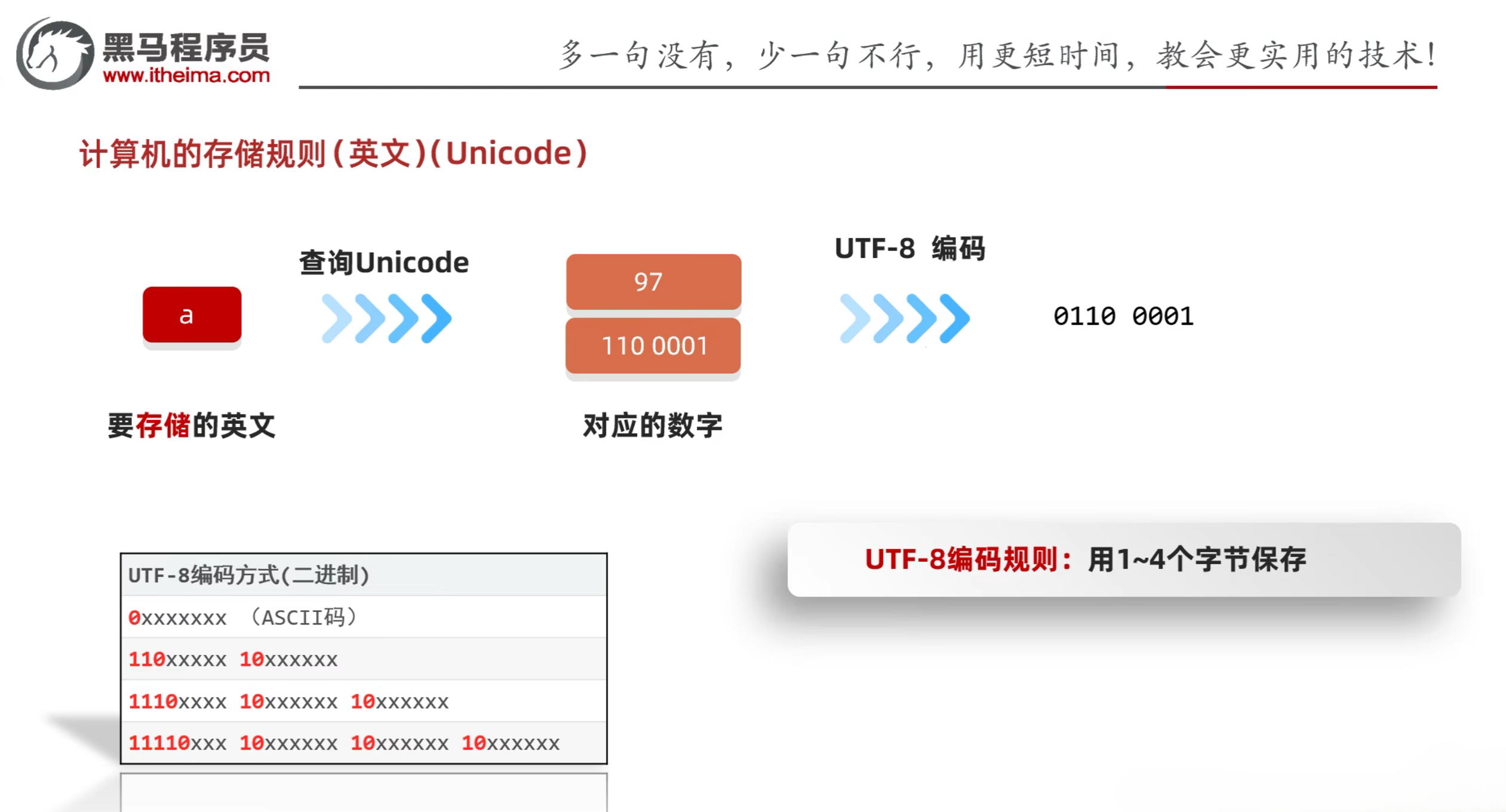
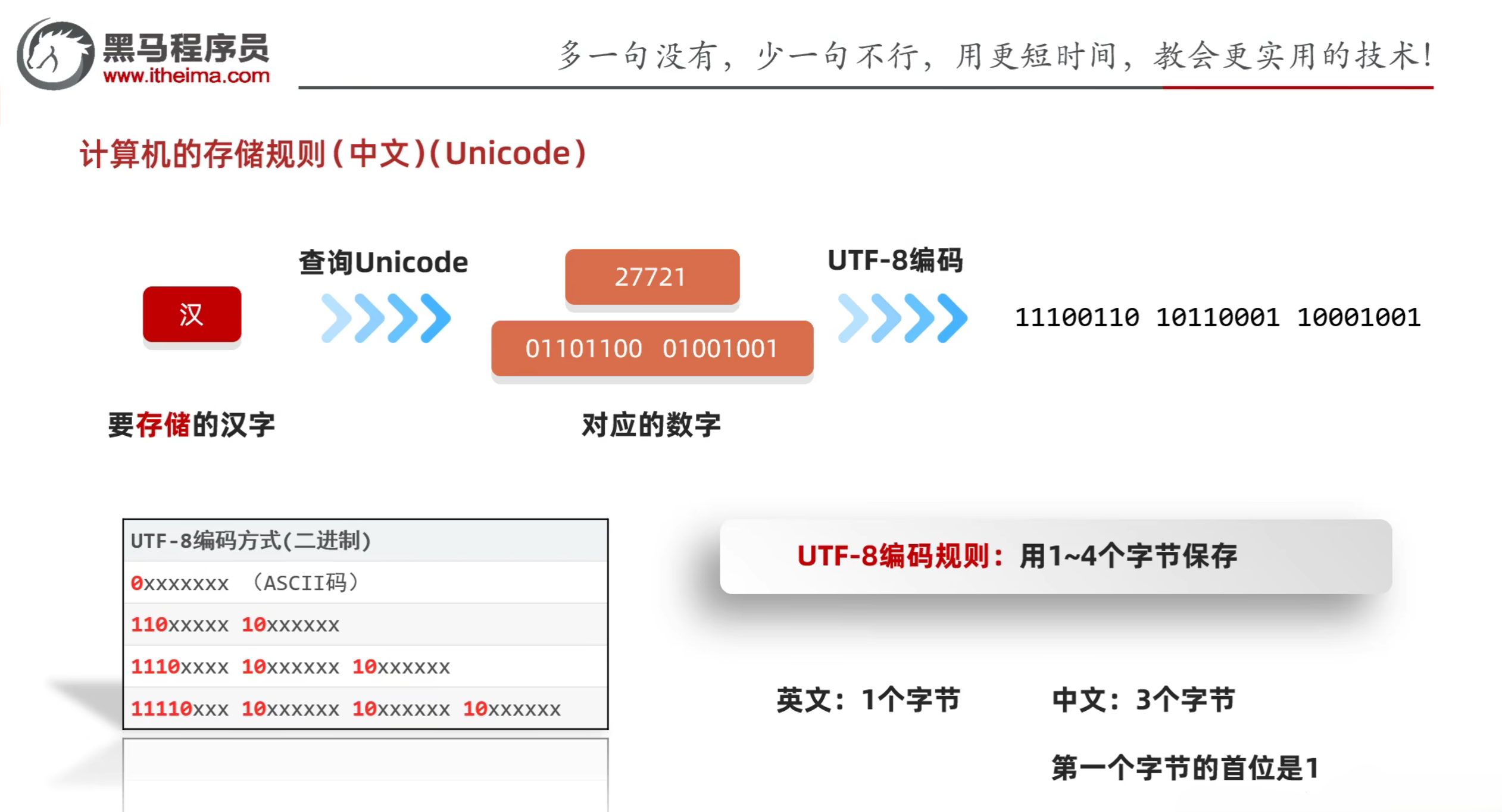
- Unicode:统一字符集,双字节编码,65536个字符(汉字、日文、韩文等),系统显示:UTF-16
ASCII存储规则:

GBK存储规则:
Unicode存储规则:
3.2 Java中的编码和解码方式
- Java中的编码方法
- public byte[] getBytes():使用默认方式进行编码
- public byte[] getBytes(String charsetName):使用指定方式进行编码
- Java中的解码方法
- String(byte[] bytes):使用默认方式进行解码
- String(byte[] bytes, String charsetName):使用指定方式进行解码
示例:
1
2
3
4
5
6
7
8
9
10
11
12
13
14
15
16
17
18
19
20
21
22
23
24
25
| import java.io.UnsupportedEncodingException;
import java.lang.reflect.Array;
import java.util.Arrays;
public class IOStreamDemo7 {
public static void main(String[] args) throws UnsupportedEncodingException {
String str = "ai你呦";
byte[] bytes1 = str.getBytes();
System.out.println(Arrays.toString(bytes1));
byte[] bytes2 = str.getBytes("GBK");
System.out.println(Arrays.toString(bytes2));
String res1 = new String(bytes1);
System.out.println(res1);
String res2 = new String(bytes2, "GBK");
System.out.println(res2);
}
}
|
3.3 字符输入流
- 字符流的底层就是字节流
- 特点
- 输入流:一次读一个字节,遇到中文,一次读多个字节
- 输出流:底层会把数据按照指定的编码方式进行编码,变成字节在写到文件中
- 使用场景
- 步骤
- 创建字符输入流对象
- public FileReader(File file):创建字符输入流关联本地文件
- public FileReader(String fileName):创建字符输入流关联本地文件
- 读取数据
- public int read():一次读取一个字符,返回读取到的字符的Unicode码
- public int read(char[] buffer):一次读取一个字符数组,返回读取到的字符数
- 细节1:按字节进行读取,遇到中文,一次读多个字节,读取后解码,返回一个整数
- 细节2:读到文件末尾,返回-1
- 释放资源
- public int close():释放资源,关闭流对象
示例:
1
2
3
4
5
6
7
8
9
10
11
12
13
14
15
16
17
18
19
20
21
22
23
24
25
26
27
28
29
30
31
32
33
34
| import java.io.FileNotFoundException;
import java.io.FileReader;
import java.io.IOException;
public class IOStreamDemo8 {
public static void main(String[] args) throws IOException {
FileReader fr = new FileReader("a.txt");
int ch;
while ((ch = fr.read()) != -1) {
System.out.print((char) ch);
}
char[] chars = new char[2];
int len;
while ((len = fr.read(chars)) != -1) {
System.out.print(new String(chars, 0, len));
}
fr.close();
}
}
|
3.4 字符输出流
- FileWriter:操作本地文件的字符输出流,可以把程序中的数据写到本地文件中
- FileWriter的构造方法
- public FileWriter(File file):创建字符输出流关联本地文件
- public FileWriter(String pathName):创建字符输出流关联本地文件
- public FileWriter(File file, boolean append):创建字符输出流关联本地文件,续写
- public FileWriter(String pathName, boolean append):创建字符输出流关联本地文件,续写
- FileWriter的成员方法
- void write(int c):写出一个字符
- void write(String str):写出一个字符串
- void write(String str, int off, int len):写出一个字符串的一部分
- void write(char[] cbuf):写出一个字符数组
- void write(char[] cbuf, int off, int len):写出一个字符数组的一部分
- 步骤
- 创建字符输出流对象
- 细节1:参数是字符串表示的路径或者是File对象都是可以的
- 细节2:如果路径不存在,系统会自动创建一个新的文件,但是要保证父级目录存在
- 细节3:如果文件已经存在,则会清空文件内容,如果不想清空可以打开续写开关
- 写数据
- 如果write方法的参数是整数,但实际上写到本地文件中的是整数在字符集上对应的字符
- 释放资源
示例:
1
2
3
4
5
6
7
8
9
10
11
12
13
14
15
16
17
| import java.io.FileWriter;
import java.io.IOException;
public class IOStreamDemo9 {
public static void main(String[] args) throws IOException {
FileWriter fw = new FileWriter("a.txt", true);
fw.write(25105);
fw.write("Hello World");
char[] chars = {'a', 'b', 'c'};
fw.write(chars);
fw.close();
}
}
|
3.5 原理解析
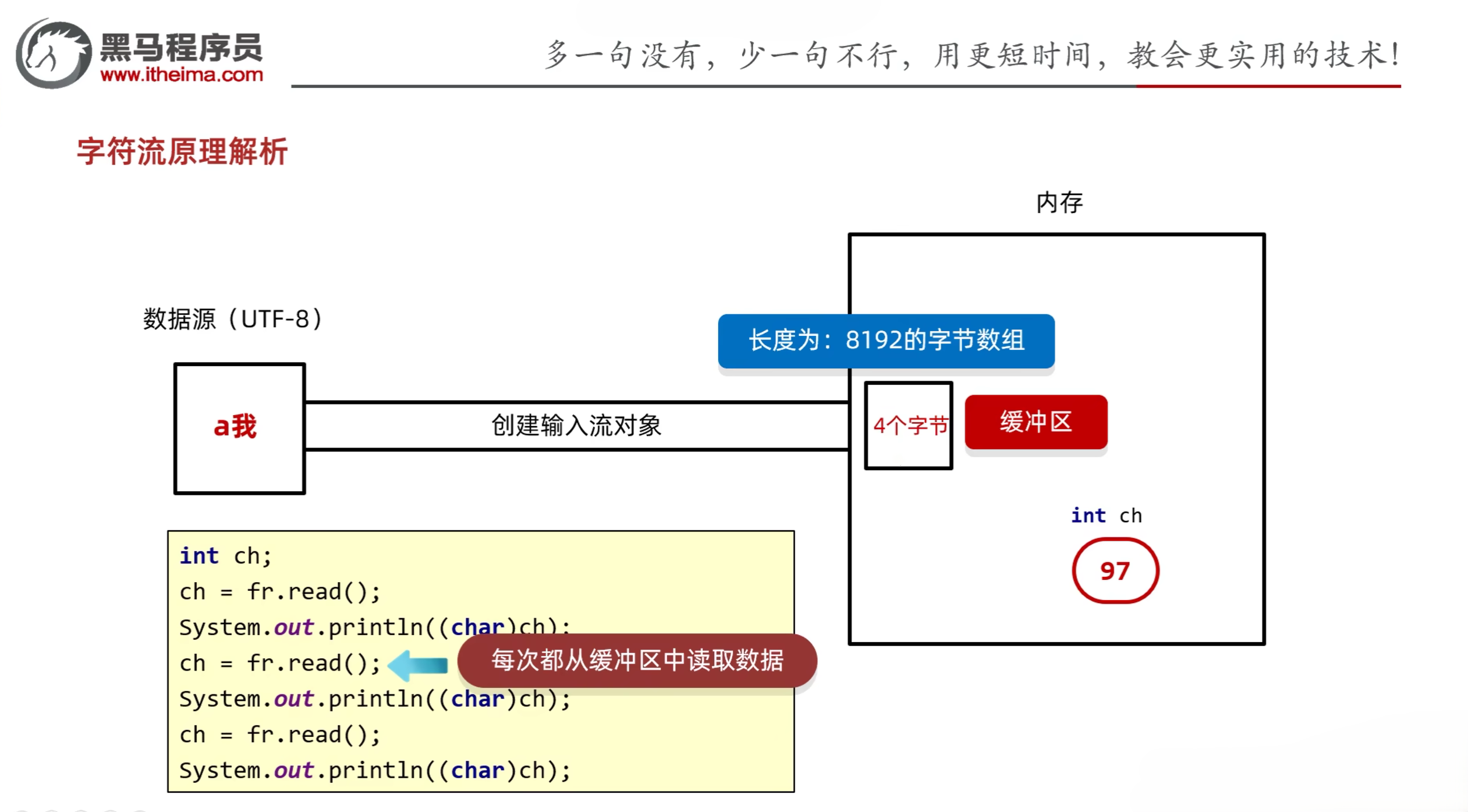
3.5.1 字符输入流原理解析
- 创建字符输入流对象
- 底层:关联文件,并创建缓冲区(长度为8192的字节数组)
- 读取数据
- 底层:
- 判断缓冲区中是否有数据可以读取
- 缓冲区没有数据:就从文件中获取数据,装到缓冲区中,每次尽可能装满缓冲区,如果文件中也没有数据量,就返回-1
- 缓冲区有数据:就从缓冲区中读取数据
- 空参的read方法:每次读取一个字节,遇到中文一次读多个字节,把字节解码并转成十进制返回
- 带参的read方法:把读取字节,解码,强转三步合并了,强转之后的字符放到数组中
3.5.2 字符输出流原理解析
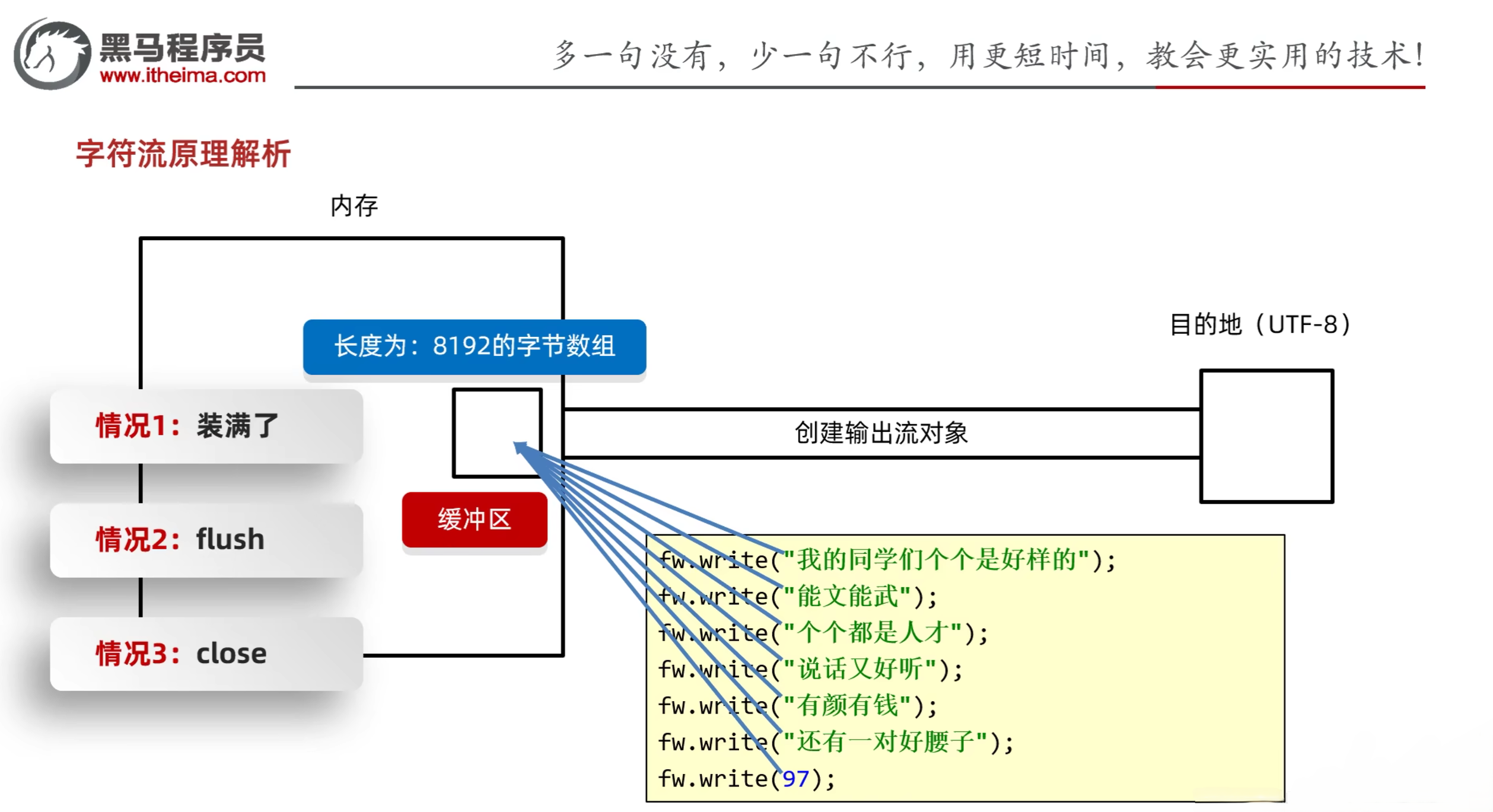
- public void flush():将缓冲区中的数据,刷新到本地文件中
- flush刷新:刷新之后,还可以继续往文件中写出数据
- public void close():释放资源,关流
3.6 练习
3.6.1 练习1:拷贝文件夹
需求:拷贝一个文件夹,考虑子文件夹
1
2
3
4
5
6
7
8
9
10
11
12
13
14
15
16
17
18
19
20
21
22
23
24
25
26
27
28
29
30
31
32
33
34
35
36
37
38
39
| import java.io.File;
import java.io.FileInputStream;
import java.io.FileOutputStream;
import java.io.IOException;
public class test1 {
public static void main(String[] args) throws IOException {
File src = new File("D:\\aaa\\src");
File dest = new File("D:\\aaa\\dest");
copydir(src, dest);
}
private static void copydir(File src, File dest) throws IOException {
dest.mkdirs();
File[] files = src.listFiles();
for (File file : files) {
if (file.isFile()) {
FileInputStream fis = new FileInputStream(file);
FileOutputStream fos = new FileOutputStream(new File(dest, file.getName()));
byte[] buf = new byte[1024];
int len;
while ((len = fis.read(buf)) != -1) {
fos.write(buf, 0, len);
}
fos.close();
fis.close();
}else {
copydir(file, new File(dest, file.getName()));
}
}
}
}
|
3.6.2 练习2:文件加密
需求:为了保证文件的安全性,就需要对原始文件进行加密存储,再使用的时候再对其进行解密处理
加密原理:对原始文件中的每一个字节数据进行更改,然后将更改后的数据存储到新的文件中
解密原理:读取加密之后的文件,按照加密的规则反向操作,变成原始文件
1
2
3
4
5
6
7
8
9
10
11
12
13
14
15
16
17
18
19
20
21
| import java.io.FileInputStream;
import java.io.FileNotFoundException;
import java.io.FileOutputStream;
import java.io.IOException;
public class test2 {
public static void main(String[] args) throws IOException {
FileInputStream fis = new FileInputStream("a.txt");
FileOutputStream fos = new FileOutputStream("b.txt");
int c;
while ((c = fis.read()) != -1) {
fos.write(c ^ 100);
}
fos.close();
fis.close();
}
}
|
3.6.3 练习3:修改文件中的内容
需求:文本文件中有以下数据:2-1-9-4-7-8
需求:把文件中的数据进行排序,排序之后的结果写入到新的文件中1-2-4-7-8-9
1
2
3
4
5
6
7
8
9
10
11
12
13
14
15
16
17
18
19
20
21
22
23
24
25
26
27
28
29
30
31
32
33
34
35
36
37
38
39
40
41
42
43
44
45
46
47
48
49
50
51
| import java.io.*;
import java.util.ArrayList;
import java.util.Arrays;
import java.util.Collections;
import java.util.function.Function;
public class test3 {
public static void main(String[] args) throws IOException {
FileReader fr = new FileReader("a.txt");
StringBuilder sb = new StringBuilder();
int c;
while((c = fr.read()) != -1) {
sb.append((char)c);
}
fr.close();
Integer[] array = Arrays.stream(sb.toString()
.split("-"))
.map(Integer::parseInt)
.sorted()
.toArray(Integer[]::new);
FileWriter fw = new FileWriter("a.txt");
String s = Arrays.toString(array);
s.replaceAll(",", "-");
s.substring(1, s.length()-1);
fw.write(s);
fw.close();
}
}
|
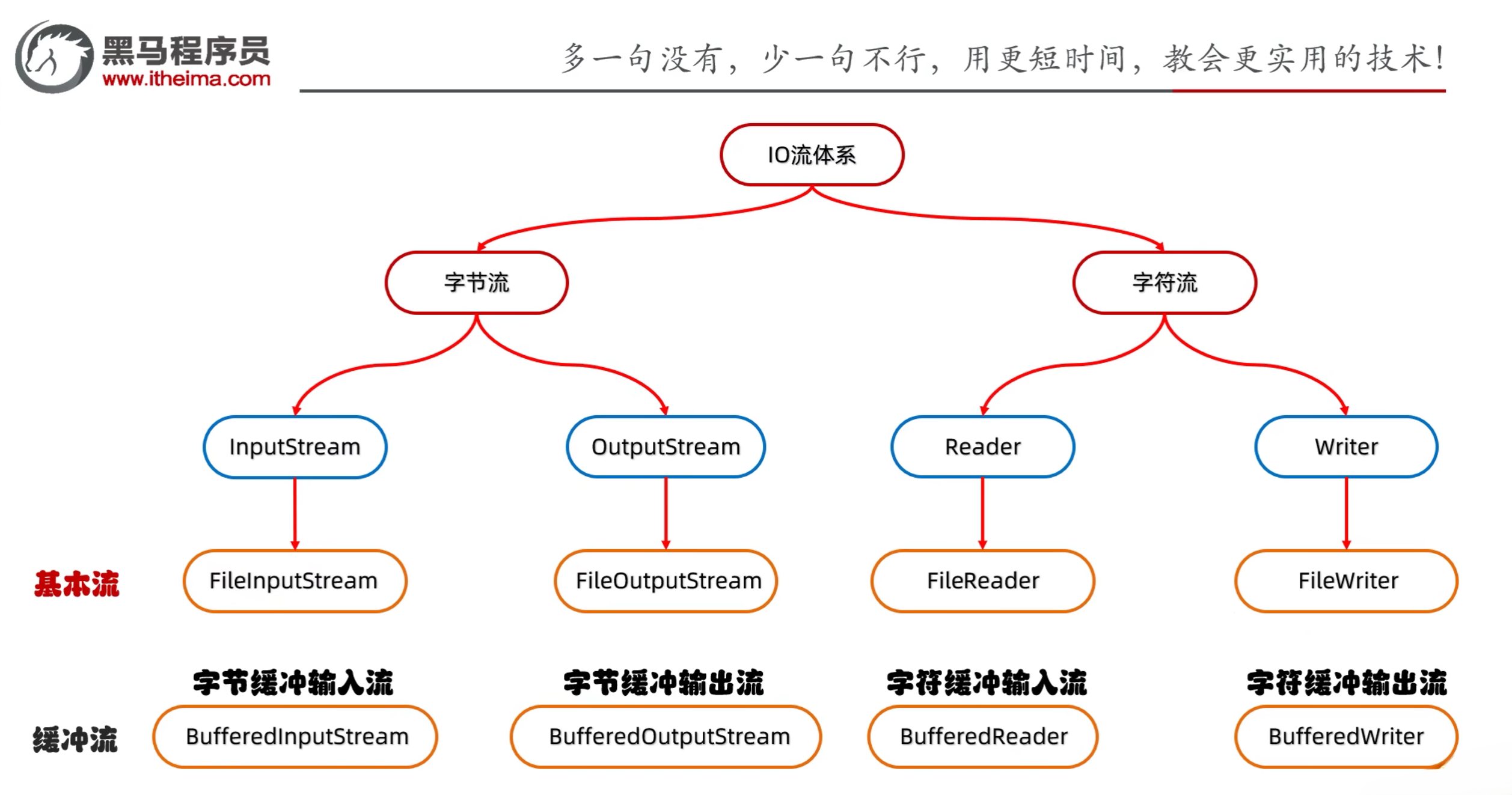
四、高级流
- 高级流:对基本流的封装,提供了更高效、更方便的读写方式
- 高级流的分类
- 字节缓冲输入流:BufferedInputStream
- 字节缓冲输出流:BufferedOutputStream
- 字符缓冲输入流:BufferedReader
- 字符缓冲输出流:BufferedWriter
4.1 字节缓冲流
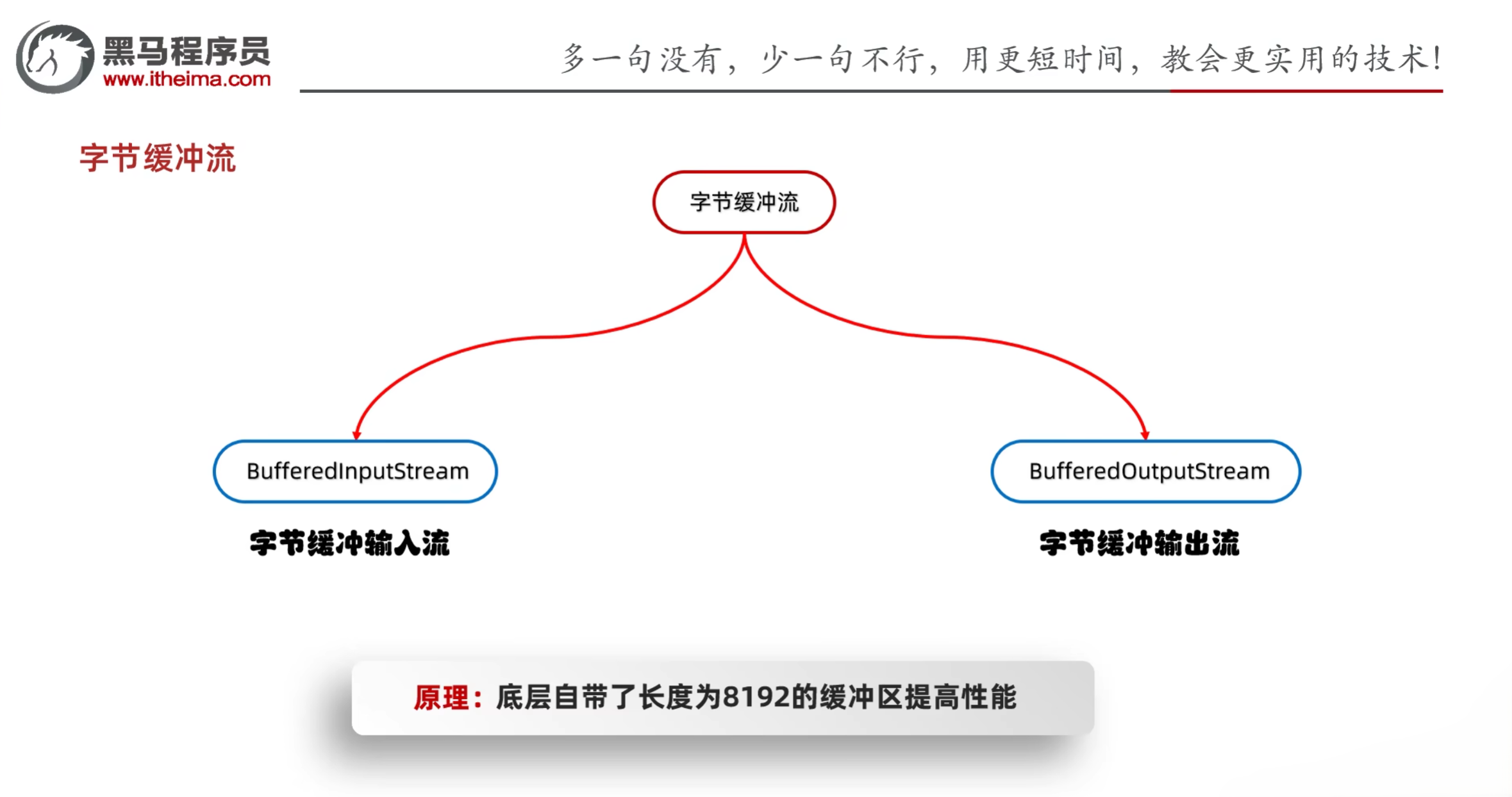
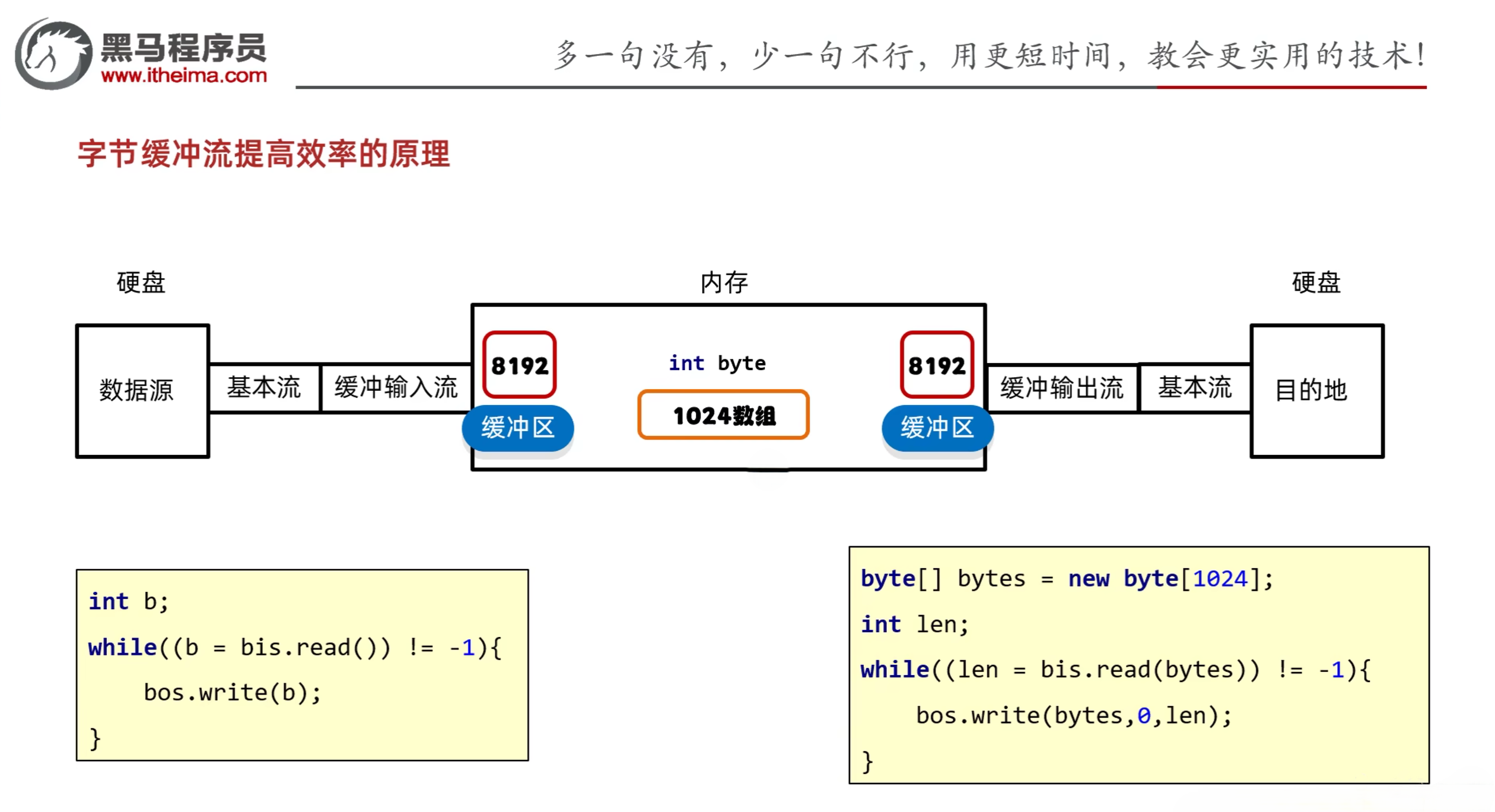
- public BufferedInputStream(InputStream is):把基本流包装成高级流,提供读取数据的性能
- public BufferedOutputStream(OutputStream os):把基本流包装成高级流,提供写出数据的性能
- 原理:底层自带了8192的缓冲区提高性能
示例:
1
2
3
4
5
6
7
8
9
10
11
12
13
14
15
16
| import java.io.*;
public class IOStreamDemo10 {
public static void main(String[] args) throws IOException {
BufferedInputStream bis = new BufferedInputStream(new FileInputStream("a.txt"));
BufferedOutputStream bos = new BufferedOutputStream(new FileOutputStream("copy.txt"));
int c;
while ((c = bis.read()) != -1) {
bos.write(c);
}
bos.close();
bis.close();
}
}
|
4.2 字符缓冲流
示例:
1
2
3
4
5
6
7
8
9
10
11
12
13
14
15
16
17
18
19
20
21
22
| import java.io.*;
public class IOStreamDemo11 {
public static void main(String[] args) throws IOException {
BufferedReader br = new BufferedReader(new FileReader("a.txt"));
String line;
while ((line = br.readLine()) != null) {
System.out.println(line);
}
br.close();
BufferedWriter bw = new BufferedWriter(new FileWriter("b.txt"));
bw.write("Hello World");
bw.newLine();
bw.write("hello world");
bw.newLine();
bw.close();
}
}
|
4.3 缓冲流练习
1.4 练习:文本排序
请将文本信息恢复顺序。
3.侍中、侍郎郭攸之、费祎、董允等,此皆良实,志虑忠纯,是以先帝简拔以遗陛下。愚以为宫中之事,事无大小,悉以咨之,然后施行,必得裨补阙漏,有所广益。
8.愿陛下托臣以讨贼兴复之效,不效,则治臣之罪,以告先帝之灵。若无兴德之言,则责攸之、祎、允等之慢,以彰其咎;陛下亦宜自谋,以咨诹善道,察纳雅言,深追先帝遗诏,臣不胜受恩感激。
4.将军向宠,性行淑均,晓畅军事,试用之于昔日,先帝称之曰能,是以众议举宠为督。愚以为营中之事,悉以咨之,必能使行阵和睦,优劣得所。
2.宫中府中,俱为一体,陟罚臧否,不宜异同。若有作奸犯科及为忠善者,宜付有司论其刑赏,以昭陛下平明之理,不宜偏私,使内外异法也。
1.先帝创业未半而中道崩殂,今天下三分,益州疲弊,此诚危急存亡之秋也。然侍卫之臣不懈于内,忠志之士忘身于外者,盖追先帝之殊遇,欲报之于陛下也。诚宜开张圣听,以光先帝遗德,恢弘志士之气,不宜妄自菲薄,引喻失义,以塞忠谏之路也。
9.今当远离,临表涕零,不知所言。
6.臣本布衣,躬耕于南阳,苟全性命于乱世,不求闻达于诸侯。先帝不以臣卑鄙,猥自枉屈,三顾臣于草庐之中,咨臣以当世之事,由是感激,遂许先帝以驱驰。后值倾覆,受任于败军之际,奉命于危难之间,尔来二十有一年矣。
7.先帝知臣谨慎,故临崩寄臣以大事也。受命以来,夙夜忧叹,恐付托不效,以伤先帝之明,故五月渡泸,深入不毛。今南方已定,兵甲已足,当奖率三军,北定中原,庶竭驽钝,攘除奸凶,兴复汉室,还于旧都。此臣所以报先帝而忠陛下之职分也。至于斟酌损益,进尽忠言,则攸之、祎、允之任也。
5.亲贤臣,远小人,此先汉所以兴隆也;亲小人,远贤臣,此后汉所以倾颓也。先帝在时,每与臣论此事,未尝不叹息痛恨于桓、灵也。侍中、尚书、长史、参军,此悉贞良死节之臣,愿陛下亲之信之,则汉室之隆,可计日而待也。
1
2
3
4
5
6
7
8
9
10
11
12
13
14
15
16
17
18
19
20
21
22
23
24
25
26
27
28
29
30
31
32
33
34
35
36
37
38
| public class Demo05Test {
public static void main(String[] args) throws IOException {
ArrayList<String> list = new ArrayList<>();
BufferedReader br = new BufferedReader(new FileReader("10_IO\\in.txt"));
BufferedWriter bw = new BufferedWriter(new FileWriter("10_IO\\out.txt"));
String line;
while((line = br.readLine())!=null){
list.add(line);
}
Collections.sort(list, new Comparator<String>() {
@Override
public int compare(String o1, String o2) {
return o1.charAt(0)-o2.charAt(0);
}
});
for (String s : list) {
bw.write(s);
bw.newLine();
}
bw.close();
br.close();
}
}
|
4.4 转换流
-
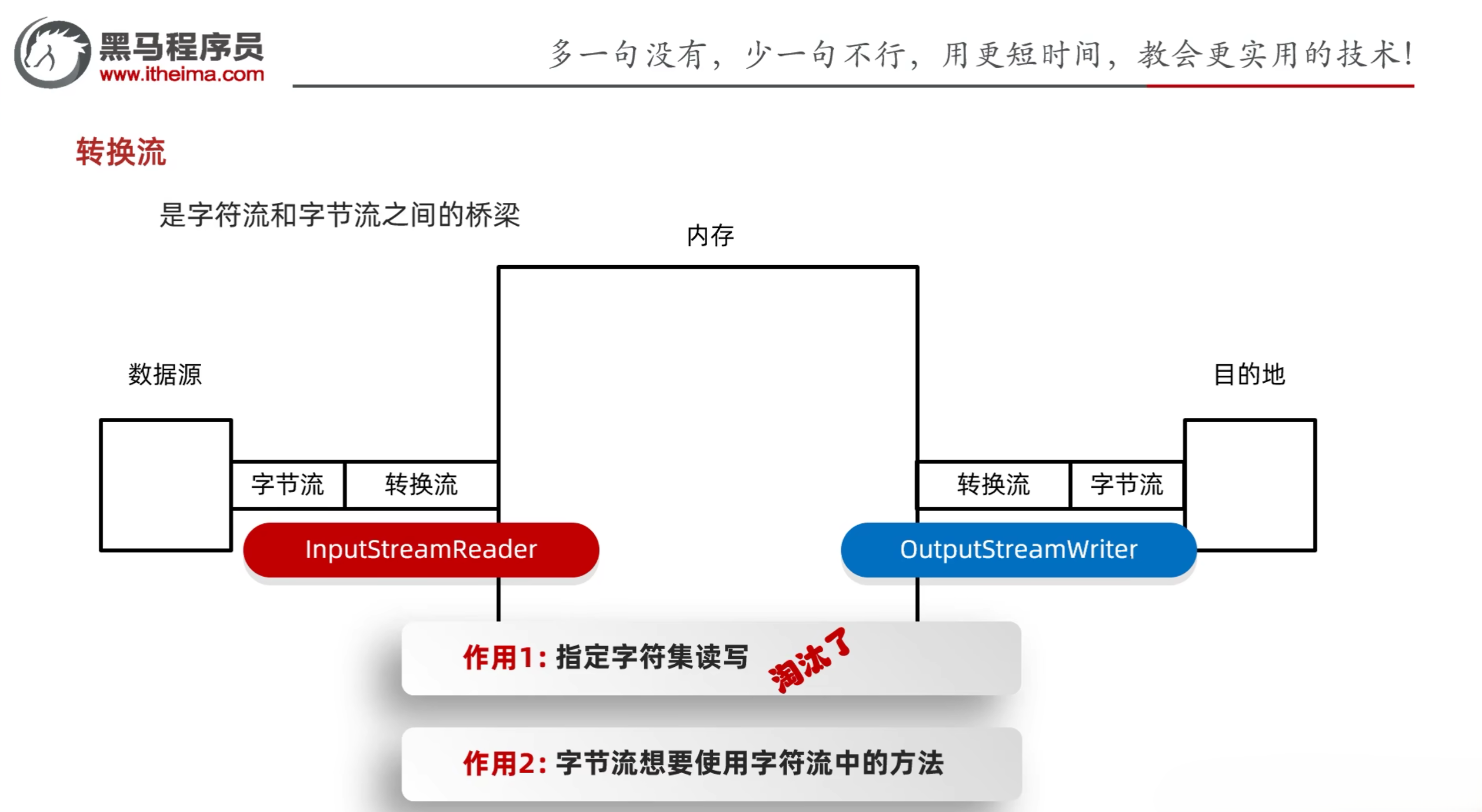
转换流:把字节流和字符流进行转换的桥梁
-
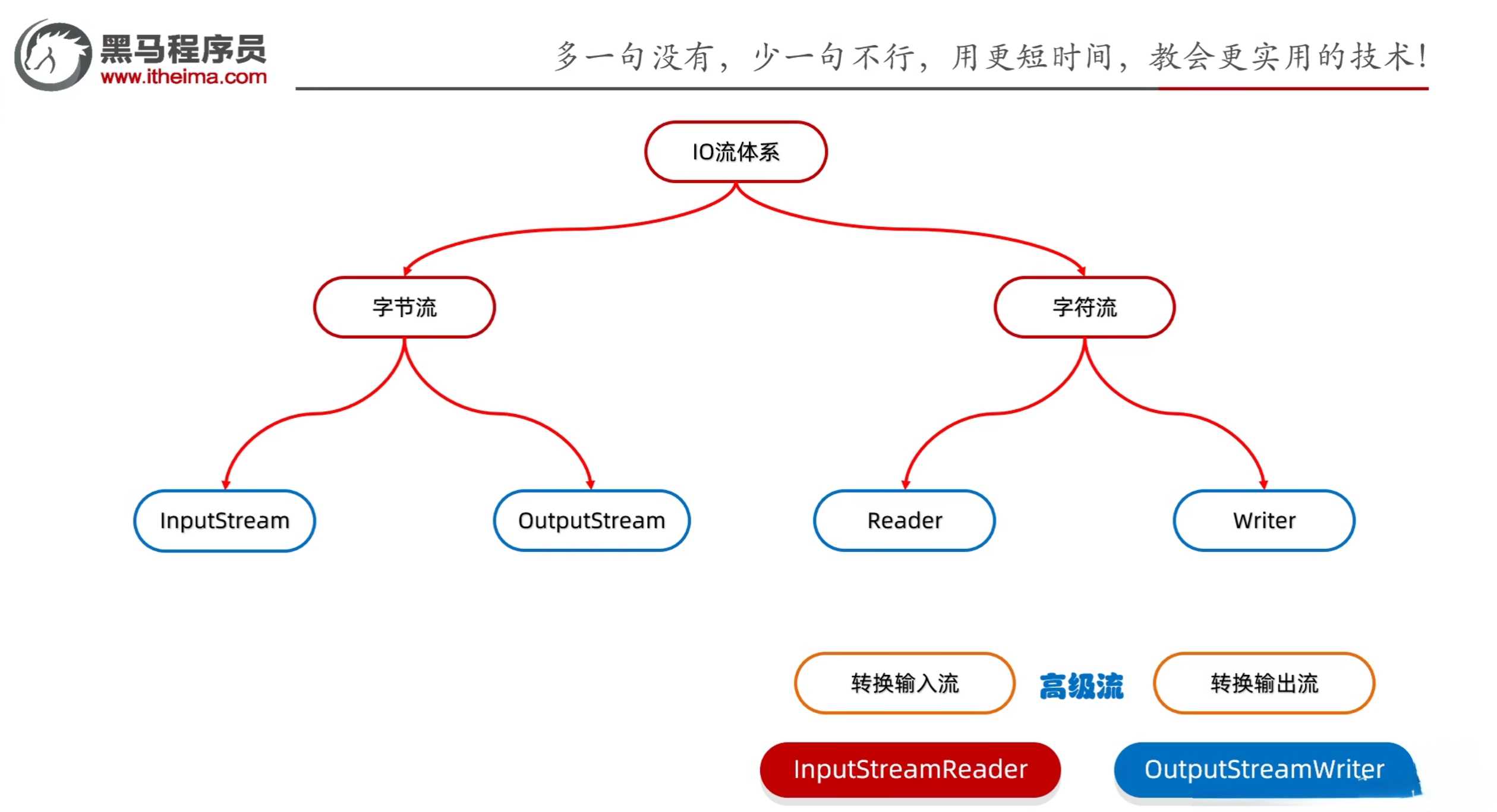
转换流实际上也属于字符流的高级流
- 转换输入流:InputStreamReader
- 转换输出流:OutputStreamWriter
-
转换流的作用
- 指定字符集读写数据(JDK之后已淘汰)
- JDK11之后可以直接使用FileReader和FileWriter的构造方法,直接传入Charset.forName对象来进行转换
- 字节流想要使用字符流中的方法了
4.5 转换流练习
4.5.1 练习1:按照指定字符编码读取
需求:利用转换流按照指定字符编码读取
1
2
3
4
5
6
7
8
9
10
11
12
13
14
15
16
17
18
19
20
21
22
23
24
25
26
27
28
| import java.io.*;
import java.nio.charset.Charset;
public class IOStreamDemo12 {
public static void main(String[] args) throws IOException {
FileReader fr = new FileReader("a.txt", Charset.forName("GBK"));
int ch;
while ((ch = fr.read()) != -1) {
System.out.print((char) ch);
}
fr.close();
}
}
|
4.5.2 练习2:利用字节流读取一整行数据
需求:利用字节流读取文件中的数据,每次读取一整行,而且不能出现乱码
1
2
3
4
5
6
7
8
9
10
11
12
13
14
15
16
17
| import java.io.*;
import java.nio.charset.Charset;
public class IOStreamDemo13 {
public static void main(String[] args) throws IOException {
BufferedReader br = new BufferedReader(new InputStreamReader(new FileInputStream("a.txt")));
String line;
while ((line = br.readLine()) != null) {
System.out.println(line);
}
br.close();
}
}
|
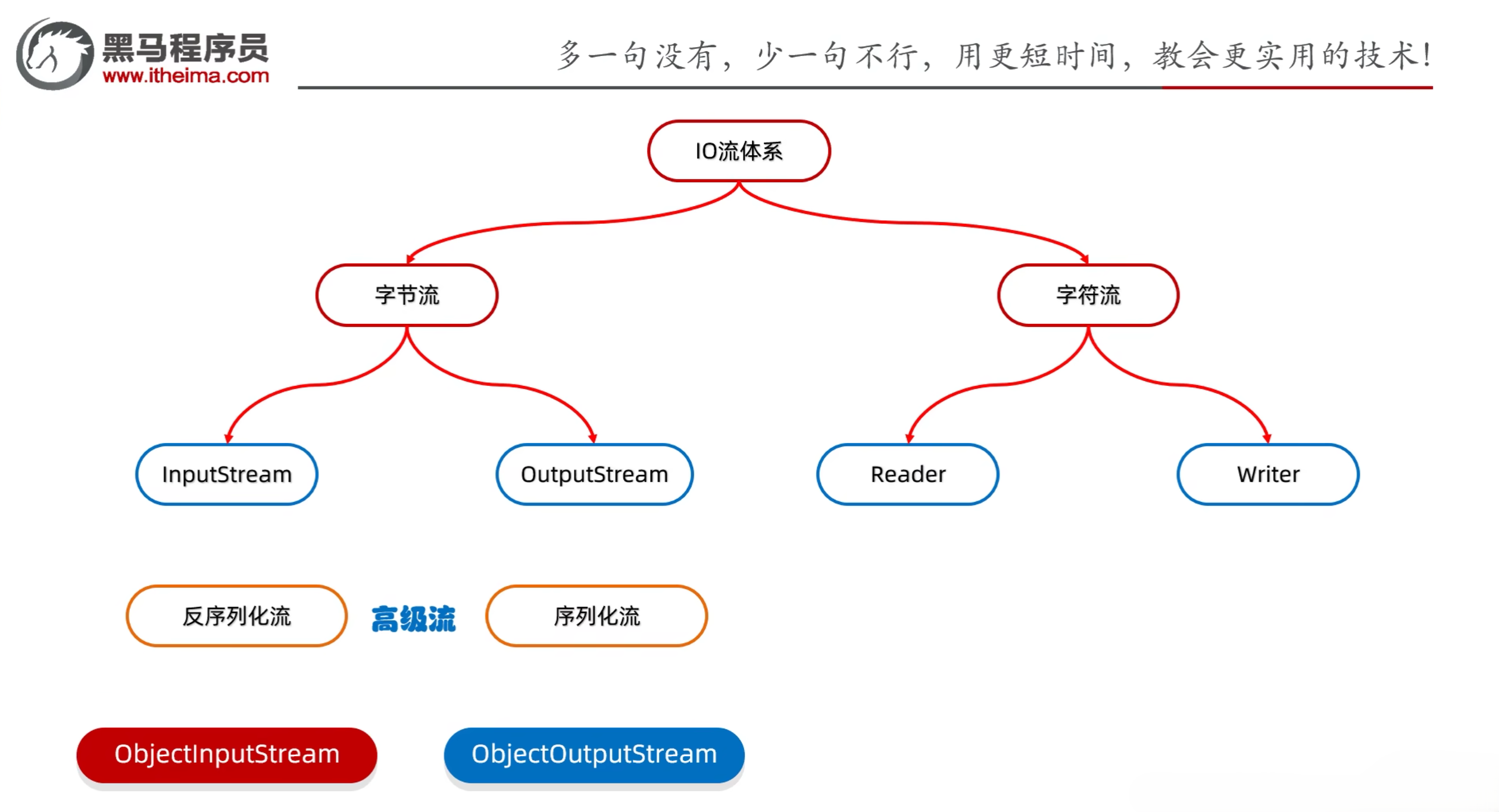
4.6 序列化流
- 序列化:把java中的对象转换成字节序列的过程
- 反序列化:把字节序列转换成java对象的过程
- 序列化流和反序列化流都属于字节流的高级流
- 序列化流(对象操作输出流):
- public ObjectOutputStream(OutputStream out):把基本流包装称高级流
- public final void writeObject(Object obj):把对象序列化(写出)到文件中去
- 细节:使用对象输出流将对象保存到文件时会出现NotSerializableException异常,需要让Javabean类实现Serializable接口
- 反序列化流(对象操作输入流):
- public ObjectInputStream(InputStream in):把基本流包装称高级流
- public object readObject():把序列化到本地文件中的对象,读到程序中来
示例:
1
2
3
4
5
6
7
8
9
10
11
12
13
14
15
16
17
18
19
20
21
22
23
24
25
26
27
28
| import java.io.*;
public class IOStreamDemo14 {
public static void main(String[] args) throws IOException, ClassNotFoundException {
Student stu = new Student("zhangsan", 23);
ObjectOutputStream oos = new ObjectOutputStream(new FileOutputStream("c.txt"));
oos.writeObject(stu);
oos.close();
ObjectInputStream ois = new ObjectInputStream(new FileInputStream("c.txt"));
Student o = (Student) ois.readObject();
System.out.println(o);
ois.close();
}
}
|
4.7 序列化流细节
4.7.1 序列化流版本号
- 序列化流的版本号:serialVersionUID
- 作用:序列化和反序列化时,判断对象是否一致
- 如果不一致,则会抛出InvalidClassException异常
- 如果一致,则可以正常进行序列化和反序列化操作
- 版本号的定义:
- private static final long serialVersionUID = 1L
示例:
1
2
3
4
5
6
7
8
9
10
11
12
13
14
15
16
17
18
19
20
21
22
23
24
25
26
27
28
29
30
31
32
33
34
35
36
37
38
39
40
41
42
43
44
45
46
47
48
49
50
51
52
53
54
55
| import java.io.Serial;
import java.io.Serializable;
public class Student implements Serializable {
@Serial
private static final long serialVersionUID = 4430830299345459386L;
private String name;
private int age;
public Student() {
}
public Student(String name, int age) {
this.name = name;
this.age = age;
}
public String getName() {
return name;
}
public void setName(String name) {
this.name = name;
}
public int getAge() {
return age;
}
public void setAge(int age) {
this.age = age;
}
public String toString() {
return "Student{name = " + name + ", age = " + age + "}";
}
}
|
4.7.2 序列化流的transient关键字
- transient关键字:表示不需要序列化的属性
- transient修饰的属性不会被序列化到本地文件中去
- transient修饰的属性在反序列化时,值为默认值
- transient修饰的属性在反序列化时,值为默认值,不能被赋值
示例:
1
2
3
4
5
6
7
8
9
10
11
12
13
14
15
16
17
18
19
20
21
22
23
24
25
26
27
28
29
30
31
32
33
34
35
36
37
38
39
40
41
42
43
44
45
46
47
48
49
50
51
52
53
54
55
| import java.io.Serial;
import java.io.Serializable;
public class Student implements Serializable {
@Serial
private static final long serialVersionUID = 4430830299345459386L;
private String name;
private transient int age;
public Student() {
}
public Student(String name, int age) {
this.name = name;
this.age = age;
}
public String getName() {
return name;
}
public void setName(String name) {
this.name = name;
}
public int getAge() {
return age;
}
public void setAge(int age) {
this.age = age;
}
public String toString() {
return "Student{name = " + name + ", age = " + age + "}";
}
}
|
4.8 序列化流练习
需求:将多个自定义对象序列化到文件中,但是由于对象的个数不确定,反序列化流该如何读取呢?
1
2
3
4
5
6
7
8
9
10
11
12
13
14
15
16
17
18
19
20
21
22
23
24
|
import java.io.FileNotFoundException;
import java.io.FileOutputStream;
import java.io.IOException;
import java.io.ObjectOutputStream;
import java.util.ArrayList;
import java.util.Collections;
import java.util.List;
public class IOStreamDemo15 {
public static void main(String[] args) throws IOException {
Student stu1 = new Student("zhangsan", 23);
Student stu2 = new Student("lisi", 24);
Student stu3 = new Student("wangwu", 25);
List<Student> students = new ArrayList<Student>();
Collections.addAll(students, stu1, stu2, stu3);
ObjectOutputStream oos = new ObjectOutputStream(new FileOutputStream("d.txt"));
oos.writeObject(students);
oos.close();
}
}
|
1
2
3
4
5
6
7
8
9
10
11
12
13
14
15
16
17
|
import java.io.*;
import java.util.List;
public class IOStreamDemo16 {
public static void main(String[] args) throws IOException, ClassNotFoundException {
ObjectInputStream ois = new ObjectInputStream(new FileInputStream("d.txt"));
List<Student> list = (List<Student>) ois.readObject();
for (Student student : list) {
System.out.println(student);
}
ois.close();
}
}
|
4.9 打印流
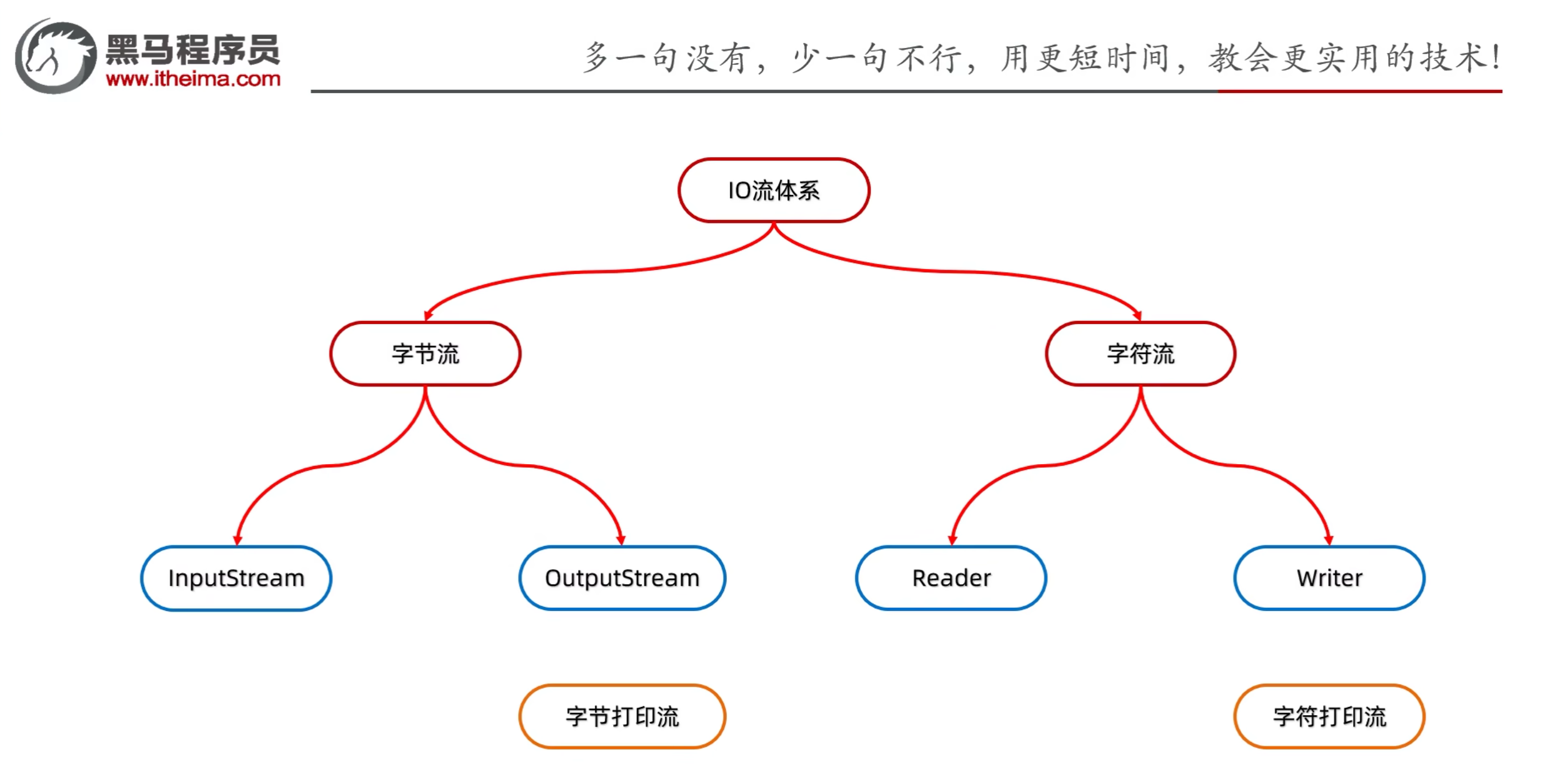
- 打印流分为字节打印流和字符打印流
- 字节打印流:PrintStream
- 字符打印流:PrintWriter
- 特点:
- 打印流只操作文件目的地,不操作数据源
- 特有的写出方法可以实现,数据原样写出
- 特有的写出方法,可以实现自动刷新,自动换行
4.9.1 字节打印流
- 字节流底层没有缓冲区,开不开自动刷新都一样
- 字节打印流构造方法
- public PrintStream(OutputStream/File/String):关联字节输出流/文件/文件路径
- public PrintStream(String fileName, Charset charset):指定字符编码
- public PrintStream(OutputStream out, boolean autoFlush):自动刷新
- public PrintStream(OutputStream out, boolean autoFlush, String encoding):指定字符编码且自动刷新
- 字节打印流成员方法
- public void write(int c):常规方法:规则跟之前一样,将指定的字节写出
- public void println(Xxx xx):特有方法:打印任意数据,自动刷新,自动换行
- public void print(Xxx xx):特有方法:打印任意数据,自动刷新,不换行
- public void printf(String format, Object… args):特有方法:带有占位符的打印语句,不换行
示例:
1
2
3
4
5
6
7
8
9
10
11
12
13
14
15
16
17
18
19
20
| import java.io.FileNotFoundException;
import java.io.FileOutputStream;
import java.io.PrintStream;
public class IOStreamDemo17 {
public static void main(String[] args) throws FileNotFoundException {
PrintStream ps = new PrintStream(new FileOutputStream("s.txt"));
ps.println(97);
ps.print(98);
ps.printf("%s 123 %s", 97, 98);
ps.close();
}
}
|
4.9.2 字符打印流
- 字符打印流构造方法
- public PrintWriter(Writer/File/String):关联字符输出流/文件/文件路径
- public PrintWriter(String fileName, Charset charset):指定字符编码
- public PrintWriter(Write w, boolean autoFlush):自动刷新
- public PrintWriter(OutputStream out, boolean autoFlush, Charset charset):指定字符编码且自动刷新
- 字符打印流成员方法
- public void write(int c):常规方法:规则跟之前一样,将指定的字节写出
- public void println(Xxx xx):特有方法:打印任意数据,自动刷新,自动换行
- public void print(Xxx xx):特有方法:打印任意数据,自动刷新,不换行
- public void printf(String format, Object… args):特有方法:带有占位符的打印语句,不换行
示例:
1
2
3
4
5
6
7
8
9
10
11
12
13
14
15
16
17
18
| import java.io.*;
public class IOStreamDemo18 {
public static void main(String[] args) throws IOException {
PrintWriter pw = new PrintWriter(new FileWriter("s.txt"), true);
pw.println("Hello World");
pw.print(98);
pw.printf("%s 123 %s", 97, 98);
pw.close();
}
}
|
4.9.3 标准输出流
1
2
3
4
5
6
7
8
9
10
11
12
13
14
| import java.io.*;
public class IOStreamDemo19 {
public static void main(String[] args) {
PrintStream ps = System.out;
ps.println("123");
System.out.println("123");
}
}
|
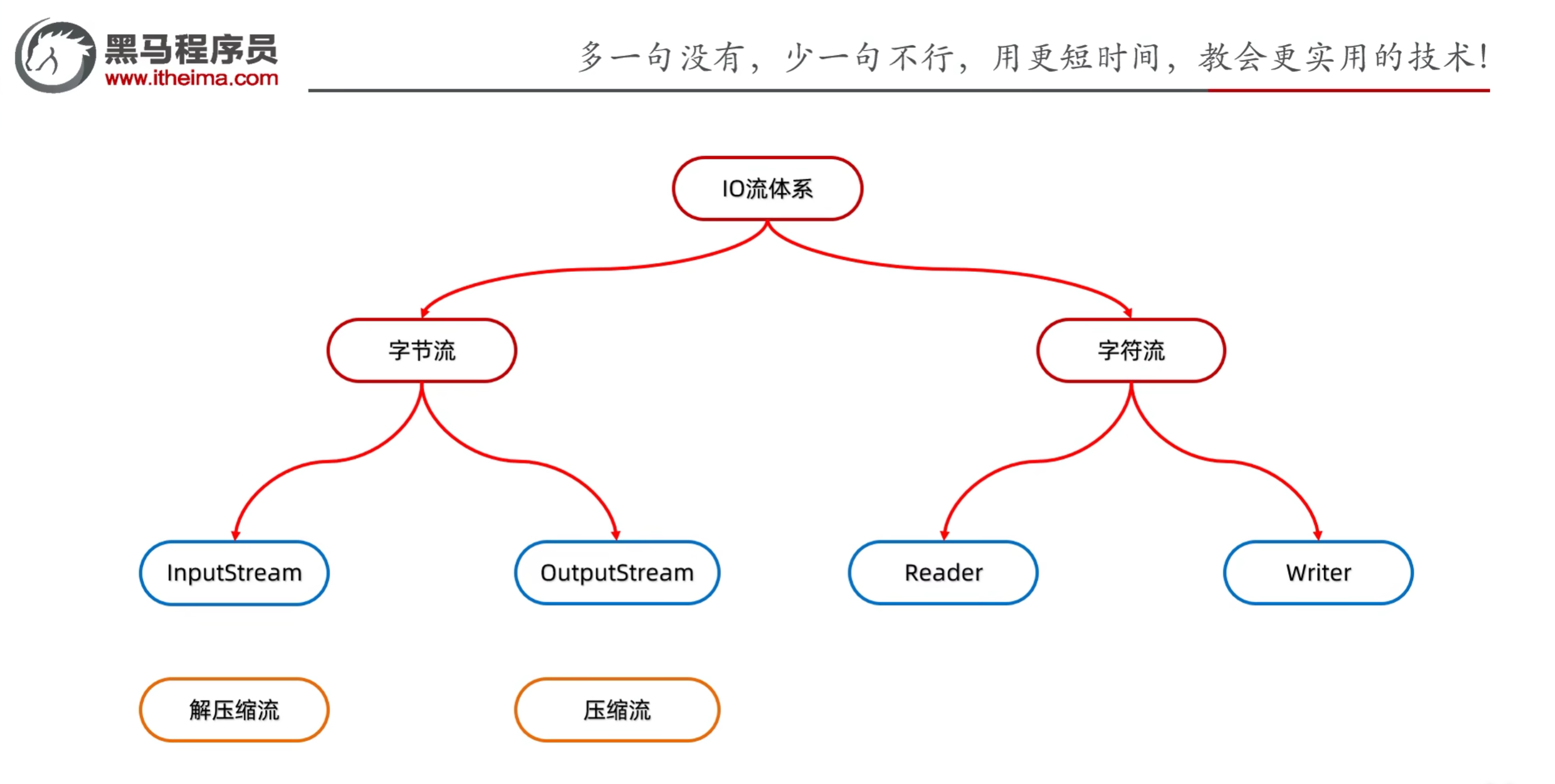
4.10 压缩流/解压缩流
- 压缩流:把文件压缩成zip格式的文件
- 解压缩流:把zip格式的文件解压缩成原始文件
4.10.1 解压缩流
- 解压的本质:把每一个ZipEntry按照层级结构拷贝到本地另一个文件夹中
解压缩流示例:
1
2
3
4
5
6
7
8
9
10
11
12
13
14
15
16
17
18
19
20
21
22
23
24
25
26
27
28
29
30
31
32
33
| import java.io.*;
import java.util.zip.ZipEntry;
import java.util.zip.ZipInputStream;
public class ZipDemo1 {
public static void main(String[] args) throws IOException {
File src = new File("aaa.zip");
File dest = new File("");
unzip(src, dest);
}
public static void unzip(File src, File dest) throws IOException {
ZipInputStream zis = new ZipInputStream(new FileInputStream(src));
ZipEntry entry;
while ((entry = zis.getNextEntry()) != null) {
if (entry.isDirectory()) {
File f = new File(dest, entry.toString());
f.mkdirs();
}else {
FileOutputStream fos = new FileOutputStream(new File(dest, entry.toString()));
int b;
while ((b = zis.read()) != -1) {
fos.write(b);
}
fos.close();
zis.closeEntry();
}
}
zis.close();
}
}
|
4.10.2 压缩流
- 压缩的本质:把每一个文件/文件夹看成ZipEntry对象放到压缩包中
示例:压缩单个文件
1
2
3
4
5
6
7
8
9
10
11
12
13
14
15
16
17
18
19
20
21
22
23
24
25
26
27
28
29
| import java.io.File;
import java.io.FileInputStream;
import java.io.FileOutputStream;
import java.io.IOException;
import java.util.zip.ZipEntry;
import java.util.zip.ZipOutputStream;
public class ZipDemo2 {
public static void main(String[] args) throws IOException {
File src = new File("D:\\Java Study\\heima\\IOStreamDemo\\src\\a.txt");
File dest = new File("D:\\Java Study\\heima\\IOStreamDemo\\");
toZip(src, dest);
}
public static void toZip(File src, File dest) throws IOException {
ZipOutputStream zos = new ZipOutputStream(new FileOutputStream(new File(dest, "a.zip")));
ZipEntry entry = new ZipEntry("a.txt");
zos.putNextEntry(entry);
FileInputStream fis = new FileInputStream(src);
int b;
while ((b = fis.read()) != -1) {
zos.write(b);
}
zos.closeEntry();
fis.close();
}
}
|
示例:压缩文件夹
1
2
3
4
5
6
7
8
9
10
11
12
13
14
15
16
17
18
19
20
21
22
23
24
25
26
27
28
29
30
31
32
33
34
35
36
| import java.io.*;
import java.util.zip.ZipEntry;
import java.util.zip.ZipOutputStream;
public class ZipDemo3 {
public static void main(String[] args) throws IOException {
File src = new File("D:\\aaa");
File destParent = src.getParentFile();
File dest = new File(destParent, src.getName() + ".zip");
ZipOutputStream zos = new ZipOutputStream(new FileOutputStream(dest));
toZip(src, zos, src.getName());
zos.close();
}
public static void toZip(File src, ZipOutputStream zos, String name) throws IOException {
File[] files = src.listFiles();
for (File file : files) {
if (file.isDirectory()) {
toZip(file, zos, name + "\\" + file.getName());
}else {
ZipEntry entry = new ZipEntry(name + "\\" + file.getName());
zos.putNextEntry(entry);
FileInputStream fis = new FileInputStream(file);
int b;
while ((b = fis.read()) != -1) {
zos.write(b);
}
fis.close();
zos.closeEntry();
}
}
}
}
|
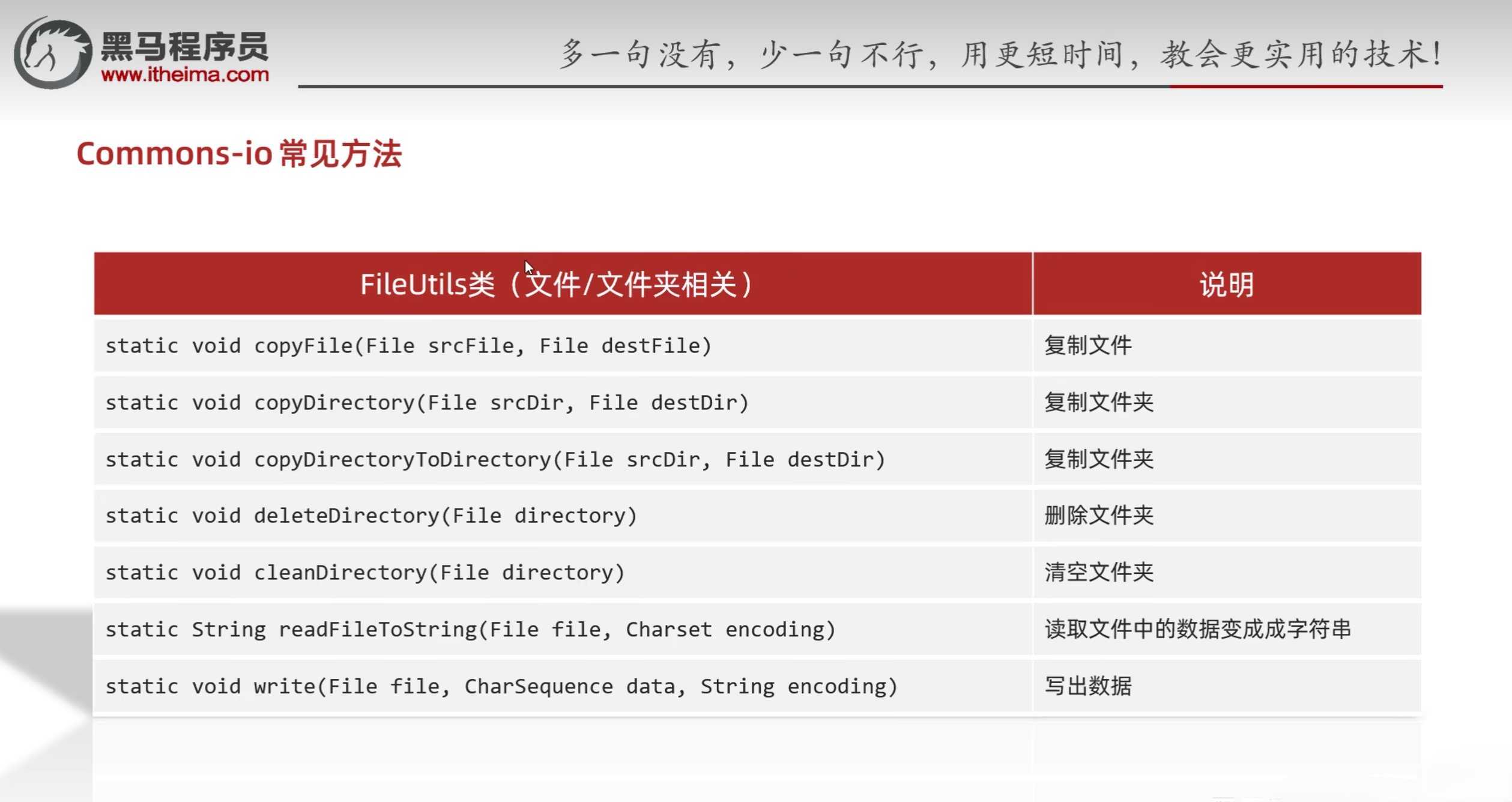
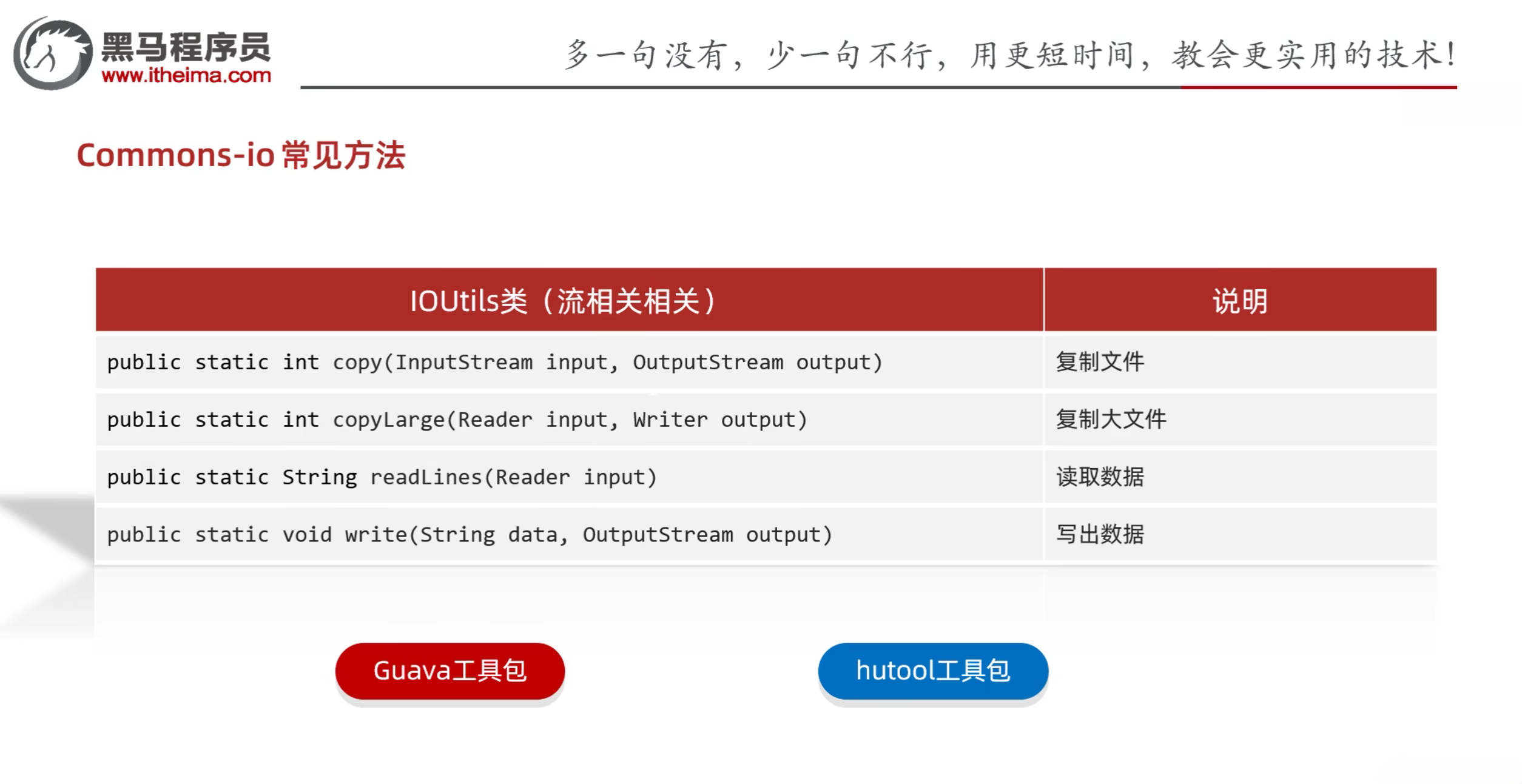
五、Commons-io工具包
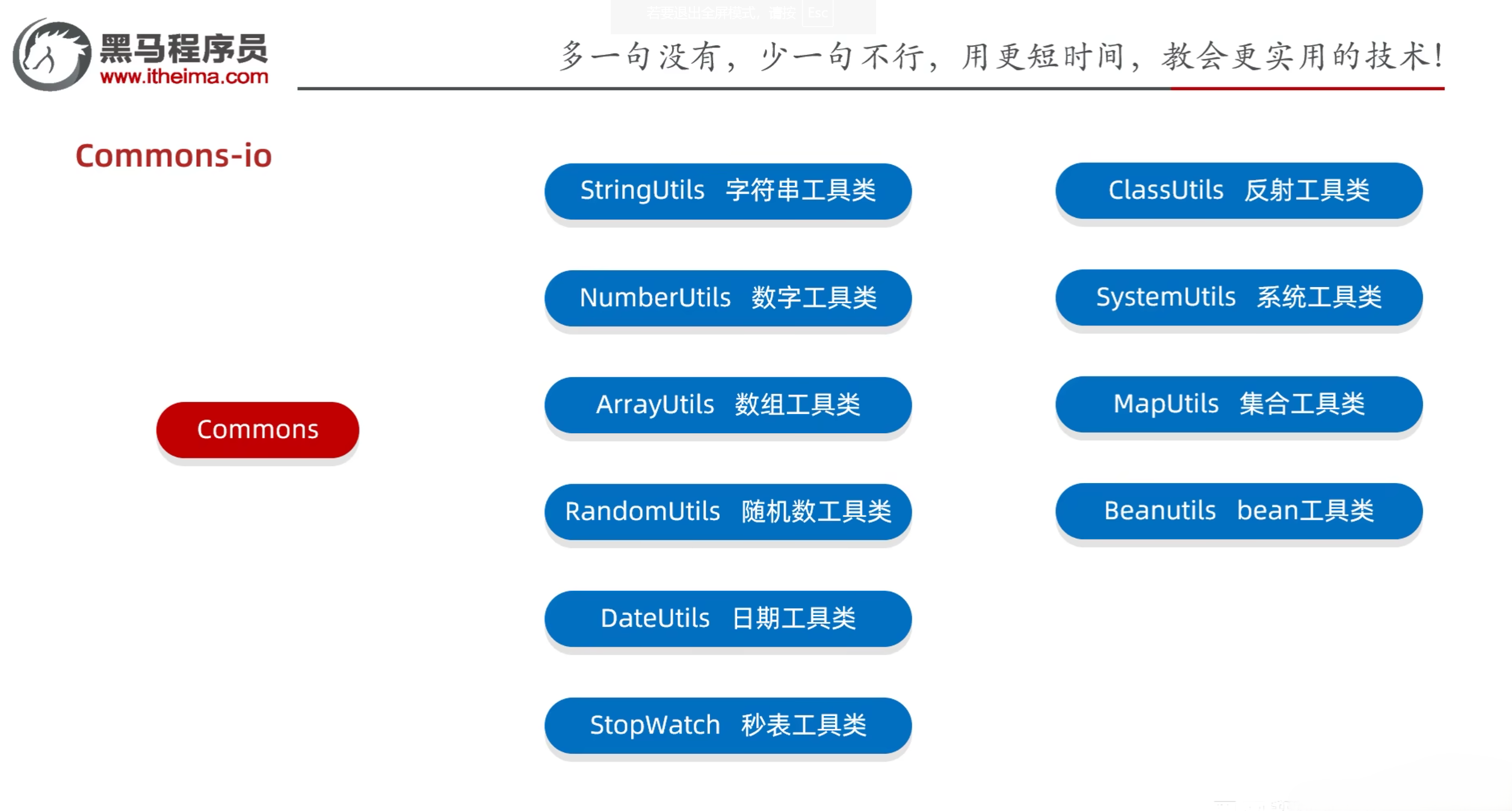
- Commons-io:Apache开源组织提供的一组有关IO操作的开源工具包
- 作用:提高IO流的开发效率
- 使用步骤
- 在项目中创建一个文件夹:lib
- 把jar包放到项目的lib目录下
- 右键点击jar包,选择Add as Library -> OK
- 在类中导包使用
Commons-io常见方法:
示例:
1
2
3
4
5
6
7
8
9
10
11
12
13
14
15
16
17
18
19
20
21
22
23
24
25
26
27
28
29
30
31
32
33
34
35
36
| public class CommonsIODemo1 {
public static void main(String[] args) throws IOException {
}
}
|
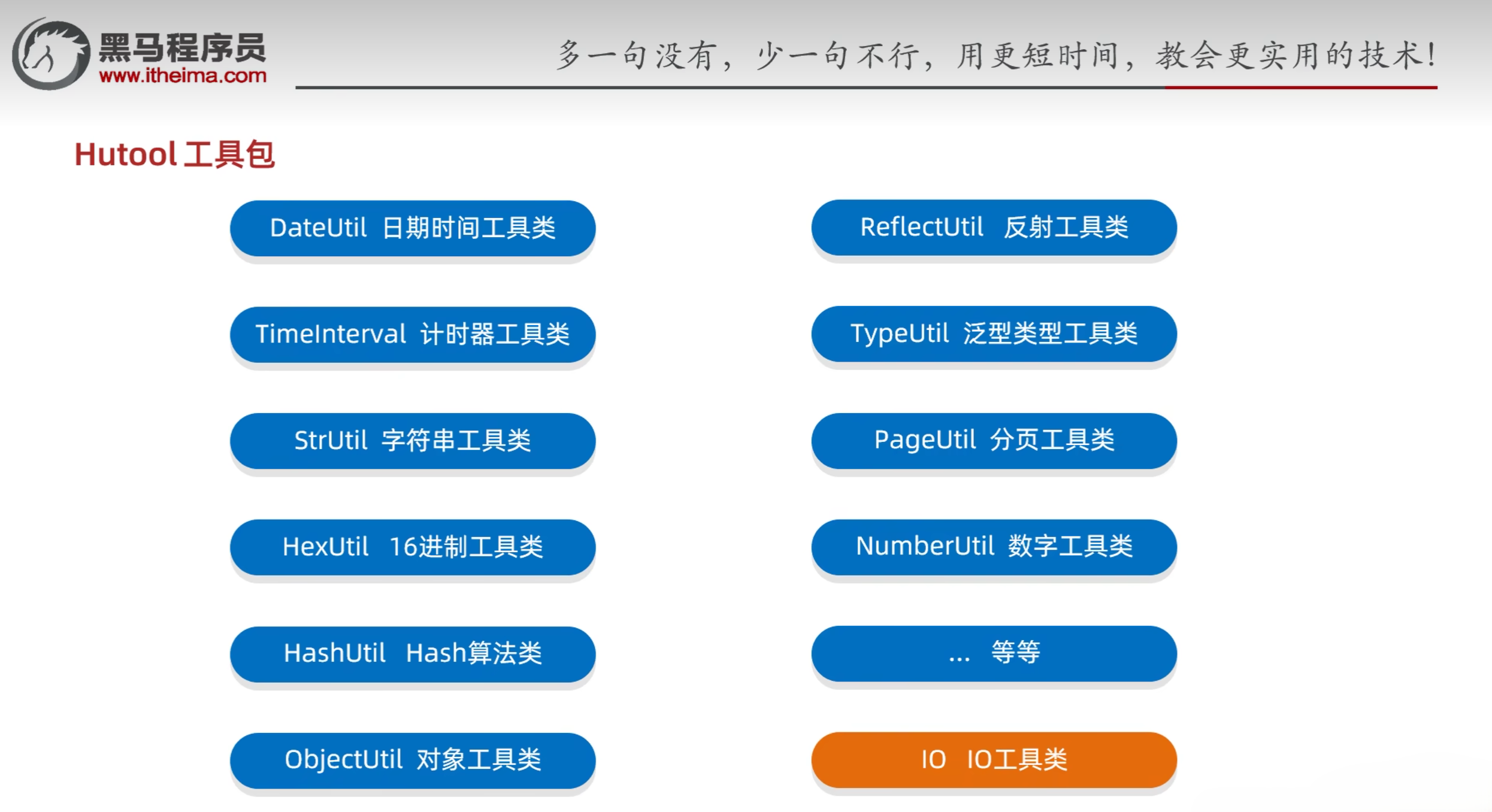
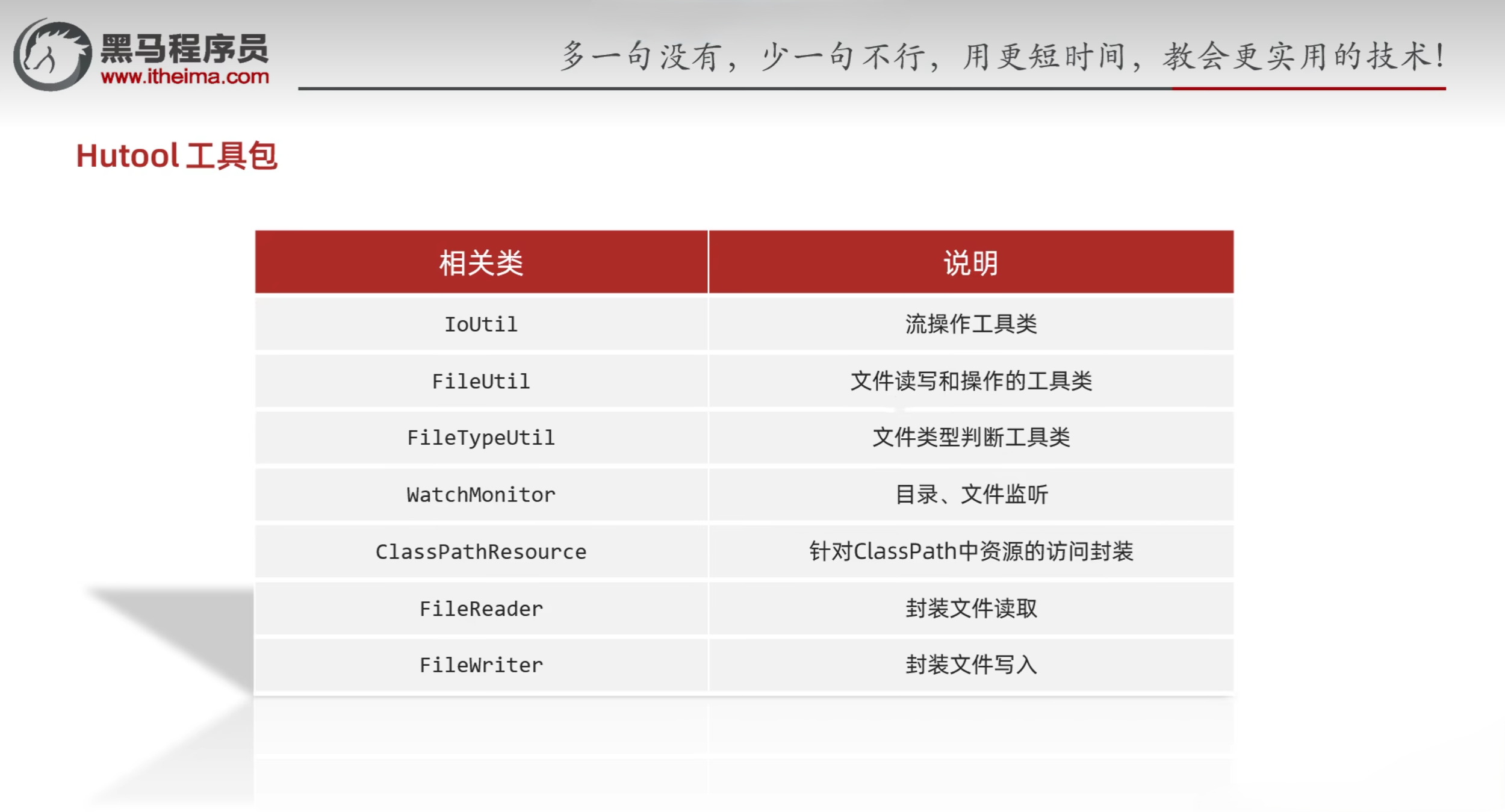
Hutool常用方法:
示例:
1
2
3
4
5
6
7
8
9
10
11
12
13
14
15
16
17
18
19
20
21
22
23
24
25
26
27
28
29
30
31
32
33
34
35
36
37
38
39
40
41
| public class Test1 {
public static void main(String[] args) {
List<String> list = FileUtil.readLines("D:\\a.txt", "UTF-8");
System.out.println(list);
}
}
|
参考资料:
[1] 黑马程序员Java零基础视频教程_下部